Using Unicode NFC and NFKC Across Input, Display, and Storage Boundaries
Using Unicode NFC and NFKC Across Input, Display, and Storage Boundaries Unicode normalization aligns string equivalence, but it does not decide an application's storage format
Published on: 2026.09.29 Last updated: 2026.09.29
A text field can display two values that both look like グループ (the Japanese word for “group”). Yet the leading グ may be one code point in one value and two in the other, so a direct comparison can report that they are different.
Unicode is a character-encoding standard for representing text from many writing systems. A code point is the number Unicode assigns to a character or symbol. One character as a reader sees it does not always correspond to one number inside a program.
Unicode normalization brings such representational differences into a defined form. It stops there, though: normalization does not decide how an application should display or store text.
Unicode defines several normalization forms, depending on how much each treats as the same character. NFC and NFKC are the names of the two you will meet most often; NF stands for Normalization Form. NFC aligns different spellings of the same character, and NFKC also aligns visual variants such as halfwidth and fullwidth forms.
So how far can you rely on each one, and where does the application have to decide for itself? The examples below use Japanese Katakana, one of the scripts used to write Japanese. Unicode also includes halfwidth compatibility forms of Katakana: グ is halfwidth, and グ is the corresponding fullwidth form. A small example accepts グループ as halfwidth input, displays it fullwidth, and stores it halfwidth again.
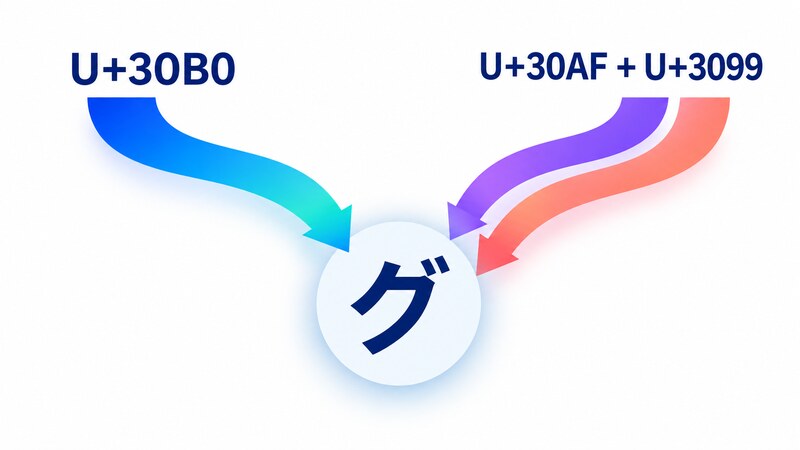
Unicode can represent the precomposed グ as the single code point U+30B0. It can also place the combining characterU+3099, which adds a voiced sound mark, after U+30AF for ク; the result looks like the same グ on screen.
On Node.js v20.19.6, the code point sequences before normalization were ["U+30B0"] and ["U+30AF", "U+3099"]. After NFC normalization, both became ["U+30B0"], and the comparison succeeded.
Why did the first comparison return false when both strings looked the same? JavaScript’s === compares the values that make up each string, not the shapes drawn on screen.
Figure 1: Different sequences can produce the same visible form
Unicode calls these two representations canonically equivalent. Canonically equivalent sequences represent the same abstract character and have the same visual appearance and behavior when displayed correctly.
ECMAScript, the language specification for JavaScript, treats a String value as an ordered sequence of 16-bit unsigned integer values. When the sequence is interpreted as text, each element is treated as a UTF-16 code unit, the 16-bit unit that makes up the string.
A String’s length is the number of those elements. In this measurement, the precomposed グ had length 1, while the decomposed sequence had length 2.
Visible character count and length are therefore not the same thing. If you also validate input length, you must separately decide whether to count code units, code points, or the units that users perceive as individual characters.
What Are NFC, NFD, NFKC, and NFKD?
Unicode Standard Annex #15 (UAX #15) defines four normalization forms. The names look alike, but they follow two axes.
Does the form cover only canonical equivalence, or broader compatibility equivalence too? K means compatibility.
Does it stop after decomposition (D), or compose again where possible (C)?
How it ends
Canonical only
Canonical and compatibility
Stop after decomposition (D)
NFD
NFKD
Compose where possible (C)
NFC
NFKC
“Decomposed” means that Unicode maps the precomposed グ to a sequence of the base character ク (U+30AF) and the combining voiced sound mark (U+3099). NFD stops at that two-code-point sequence. NFC can compose it back to グ (U+30B0).
Composition takes a fully decomposed sequence and returns it to a precomposed character when Unicode allows one. Not every sequence has a one-character composite, so “where possible” matters.
NFKC and NFKD, the forms with K in their names, also cover the broader relation called compatibility equivalence. Compatibility-equivalent forms correspond to the same abstract character or sequence, but may differ in appearance or behavior, such as width or styling.
The following examples were measured on Node.js v20.19.6 with ICU 77.1, the internationalization library that supplies Unicode processing, and Unicode 16.0.
Input
NFC
NFKC
Distinction folded by NFKC
グ
グ
グ
Halfwidth versus fullwidth
①
①
1
Circled versus uncircled digit
A
A
A
Fullwidth versus halfwidth letter
Ideographic space (U+3000)
Ideographic space (U+3000)
ASCII space (U+0020)
Space width
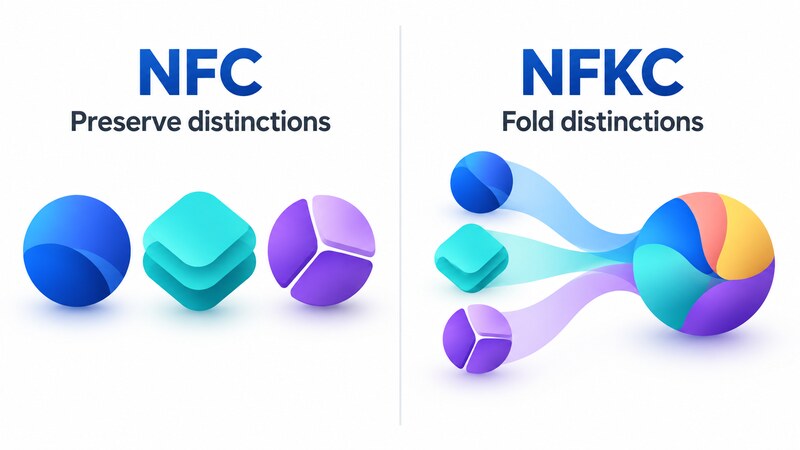
NFC resolved canonical differences while preserving these compatibility distinctions. NFKC folded not only halfwidth Katakana, but also the distinctions in circled digits, fullwidth Latin letters, and ideographic spaces.
Figure 2: Preserving distinctions and folding distinctions are different choices
Unicode Standard Annex #15 cautions against applying NFKC or NFKD blindly to arbitrary text because a compatibility distinction may carry meaning in a particular context.
Turning a circled digit into a plain digit may suit a value used for search comparison, but not a field that should reproduce exactly what the user typed. Choosing NFKC means deciding that, in the converted value for that specific purpose, width and other compatibility distinctions may be folded.
What JavaScript’s normalize Method Guarantees
JavaScript exposes Unicode normalization through String.prototype.normalize(). ECMAScript specifies NFC when the argument is omitted and permits only the strings NFC, NFD, NFKC, and NFKD as form names.
In the same Node.js environment, omitting the argument produced the same result as NFC, while an invalid form name produced a RangeError, the exception used for an argument outside the permitted range.
normalize('NFKC') guarantees conversion to NFKC. A halfwidth representation required by a particular API or file format needs a separate conversion defined by that storage contract.
Input, Display, and Storage Are Three Contracts
Back to グループ from the opening: besides the voiced sound mark on グ, it has a semi-voiced sound mark on プ. The application accepts its halfwidth form グループ, displays グループ, and requires a halfwidth Katakana sequence for storage. This example covers only the four display-side code points グ, ル, ー, and プ and four corresponding storage mappings.
Applying NFKC to the input produced the display value グループ in the measurement. Passing that value directly to storage left it fullwidth rather than restoring the expected グループ.
Why does another call to NFKC not restore the halfwidth storage form? NFKC performs compatibility decomposition and then canonical composition; it is not an inverse conversion that reconstructs halfwidth Katakana.
The display and storage transformations therefore need separate names and responsibilities. In the minimal measured code, the display boundary applies NFKC, while the storage boundary converts the four display-side code points with an explicit four-entry mapping.
Here, toDisplay('グループ') returned グループ, and toStorage('グループ') returned グループ. When the storage transformation was removed and the display value was stored directly, comparison with the expected value returned false.
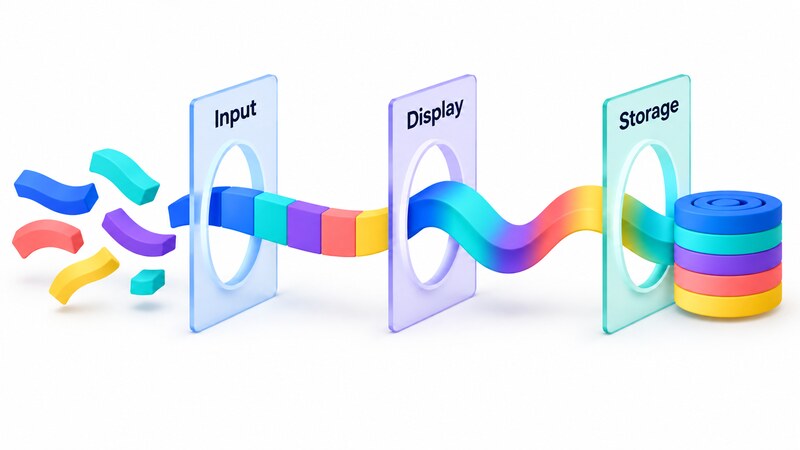
Figure 3: Input, display, and storage are separate contracts
Treat accepted input, displayed text, and the value sent to an external destination as three separate contracts. The small mapping above tests that idea only for グループ.
If the exact form entered by the user carries meaning, another option is to store both the raw input and a normalized value used for comparison or search. A value stored only after NFKC cannot later reveal whether the user entered ① or 1, or a fullwidth or halfwidth form, so that preservation decision must be made before normalization.
If the storage destination accepts NFC, NFC alone may be enough at the storage boundary. If an external format requires another character set or representation, a separate conversion for that format is needed after Unicode normalization.
Choose the Normalization Point at a Boundary
Would normalizing on every input event solve the whole problem? Display during input, comparison, and storage serve different purposes, so the code is easier to follow when it states its intent where a string crosses a responsibility boundary rather than applying one form everywhere.
At a comparison boundary, first decide which distinctions the application may ignore, then choose NFC or NFKC. At a display boundary, decide whether to preserve or normalize the user’s spelling; at a storage boundary, follow the destination’s contract.
String concatenation creates another easily missed boundary. Unicode Standard Annex #15 says that concatenating two strings that are individually normalized does not guarantee that the result is normalized.
const left = '\u30AF'.normalize('NFC');
const right = '\u3099'.normalize('NFC');
const joined = left + right;

console.log(left === left.normalize('NFC')); // true
console.log(right === right.normalize('NFC')); // true
console.log(joined === joined.normalize('NFC')); // false
console.log(joined.normalize('NFC')); // グ
The measurement confirmed that ク and the combining voiced sound mark were individually in NFC, but their concatenation was not. Applying NFC after concatenation produced the code point sequence ["U+30B0"], the precomposed グ.
You cannot assume that an assembled string is normalized just because each part was normalized. If the string-building operation requires a normal form—a string aligned with the selected normalization form—normalize again at the boundary after concatenation.
Test the Connections Between Boundaries
If a unit test, which checks one function in isolation, passes for the normalization function, is the entire input-to-storage path safe? A correct function does not prevent code from accidentally connecting the display value directly to storage and breaking the three contracts.
The verification checks three stages separately. It observes each transformation and how the input reaches the final storage value.
Confirm that the two raw forms of グ differ, but become equal after NFC.
Confirm that NFKC turns the halfwidth Katakana input into the fullwidth display value.
Confirm that the storage transformation produces the expected halfwidth sequence.
The variant with the storage transformation removed failed its comparison against the expected storage value. Checking not only the correct result, but also that an assertion comparing expected and actual values fails in that modified variant, demonstrates that the test can catch a boundary wiring mistake.
This verification was limited to Node.js v20.19.6, ICU 77.1, Unicode 16.0, macOS arm64, and the representative characters used in the measurements. It did not test conformance across all Unicode characters, browser event ordering during text-composition assistance, or the effects of database string-comparison rules and indexes.
A Design Checklist
Before adding Unicode normalization, make sure you can answer the following questions. Start with the distinctions you need to preserve or fold rather than choosing a form by name.
Should comparisons treat only canonically equivalent forms as equal, or compatibility-equivalent forms as well?
In the converted value used for comparison or storage, may NFKC fold distinctions such as circled digits, character width, and space width? Do you need to preserve the original input separately?
Do the value shown to users and the value sent to an API or file follow the same contract?
After concatenation or partial updates, must the string still be in the selected normal form?
Does the boundary test fail when one transformation is removed?
NFC aligns canonically equivalent representations while preserving compatibility distinctions. NFKC broadens what can compare equally, but its converted result may also fold a visually meaningful distinction.
For that reason, Unicode normalization aligns string equivalence, but it does not decide an application’s storage format. Separate the input, display, and storage contracts, then test what each boundary preserves so that differences invisible on screen do not remain invisible in the system.