
A WHERE updated_at > ? Sync Drops the Rows That Commit Late
The boundary between synced and not-yet-synced has to come from a clock outside the data, not from a timestamp buried inside it

Say you’re moving order rows from one system into another on a schedule. Shipping the entire table every single time is wasteful, so you only want the rows that changed since the last run. Most people reach for a query that looks roughly like this.
SELECT * FROM orders WHERE updated_at > :last_sync_atTake the newest updated_at among the rows you got back, save it as next run’s :last_sync_at, and you’re done. The implementation is a handful of lines, and a quick row-count test passes every time.
Change-data feeds into a downstream API, periodic ingestion from a third-party service, search-index refresh, partial cache invalidation, offline sync on a mobile client — the names differ, but almost all of them boil down to this same shape. It looks like it works, so plenty of people write it once and never look at it again.
Then, after it has been running for a while, one row quietly fails to show up. No error. No warning. Run the exact same query again and again, and that one row never appears. So what actually happened?
Defining the high-water mark
Let’s name the pattern first. Remembering how far you got last time as a single value, and fetching only what’s past that point next time, is usually called the high-water mark pattern. It’s a common term in extract-transform-load (ETL) work, and using something like updated_at — a “when this row was last written” timestamp — as the cut line is by far the most common variant.
The appeal is straightforward. You never have to rescan the whole table; as long as updated_at is indexed, fetching the delta is a cheap query. You barely need new columns, either, since most applications already carry an updated_at column for other reasons.
But the pattern has one quiet failure mode: the value used to draw the line — updated_at — lives inside the very data that the line is supposed to be cutting. What happens when you borrow your ruler from the thing you’re trying to measure? Let’s look at that concretely.
Which “now” does your query actually mean
updated_at is usually stamped with the database’s own “now” at write time. In PostgreSQL, that’s typically now() or CURRENT_TIMESTAMP. The official docs have a line that’s easy to skim past.
Since these functions return the start time of the current transaction, their values do not change during the transaction.
(PostgreSQL official documentation — Date/Time Functions and Operators)
now() does not return the instant your query ran. It returns the instant the surrounding transaction began. No matter how long the transaction runs, or how many times you call it, the value never changes.
If you actually want the current instant, you need clock_timestamp(). The same documentation is explicit that clock_timestamp() can change even within a single SQL statement, in clear contrast to now(). There’s a third option, too — statement_timestamp() — if all you want is when the current statement began.
So “now” is at least three different things, depending on which function you ask. The next scenario shows exactly why that distinction matters.
Commit order is not the same as stamped-time order
A sync job can only read committed rows. That’s not a subtle configuration detail — it’s the definition of “commit.” An uncommitted row from another connection simply isn’t visible yet, and confirming that experimentally gives exactly the expected result.
writer.exec('BEGIN IMMEDIATE');
writer.prepare('INSERT INTO orders VALUES(?,?)').run('A', '2026-09-14T10:00:00.000Z');
console.log('writer transaction still open  -> rows the reader sees:', count());
writer.exec('COMMIT');
console.log('after the writer commits       -> rows the reader sees:', count());
writer transaction still open -> rows the reader sees: 0
after the writer commits -> rows the reader sees: 1None of that is surprising on its own. The real problem is that the order rows commit in and the order their updated_at timestamps fall in don’t have to match. Because now() returns the transaction’s start time, a transaction that starts early but commits late shows up much later, still carrying an old timestamp.
Picture this: row B belongs to a short transaction that starts at 10:00:05 and commits almost immediately. Row A belongs to a long transaction that starts earlier, at 10:00:00, but commits long after B does.
function sync(label) {
  const rows = db
    .prepare('SELECT id, updated_at FROM orders WHERE updated_at > ? ORDER BY updated_at, id')
    .all(watermark);
  for (const r of rows) delivered.add(r.id);
  if (rows.length > 0) watermark = rows[rows.length - 1].updated_at;
}

writeInTransaction('B', '2026-09-14T10:00:05.000Z');  // short transaction
sync('sync #1 (10:00:10)');
writeInTransaction('A', '2026-09-14T10:00:00.000Z');  // long transaction, commits later
sync('sync #2 (10:00:30)');
for (let i = 3; i <= 12; i++) sync('sync #' + i);
sync #1 (10:00:10) -> fetched: ["B"] / next watermark: 2026-09-14T10:00:05.000Z
sync #2 (10:00:30) -> fetched: [] / next watermark: 2026-09-14T10:00:05.000Z
sync #3 -> fetched: [] / next watermark: 2026-09-14T10:00:05.000Z
sync #4 -> fetched: [] / next watermark: 2026-09-14T10:00:05.000Z
sync #5 -> fetched: [] / next watermark: 2026-09-14T10:00:05.000Z
sync #6 -> fetched: [] / next watermark: 2026-09-14T10:00:05.000Z
sync #7 -> fetched: [] / next watermark: 2026-09-14T10:00:05.000Z
sync #8 -> fetched: [] / next watermark: 2026-09-14T10:00:05.000Z
sync #9 -> fetched: [] / next watermark: 2026-09-14T10:00:05.000Z
sync #10 -> fetched: [] / next watermark: 2026-09-14T10:00:05.000Z
sync #11 -> fetched: [] / next watermark: 2026-09-14T10:00:05.000Z
sync #12 -> fetched: [] / next watermark: 2026-09-14T10:00:05.000Z
rows in the table : ["A","B"]
rows delivered : ["B"]
rows missed : ["A"] / count: 1Sync #1 picks up B, and the watermark advances to B’s timestamp, 10:00:05. A commits after that, and from sync #2 onward WHERE updated_at > watermark never matches A again, because A’s stamped time, 10:00:00, is older than the 10:00:05 watermark.
Here’s the part that matters most: running it a 3rd time, a 10th time, a 12th time changes nothing. The table holds two rows, A and B, but only B was ever delivered. A is gone for good. No count mismatch, no error — just one row that silently drops out of the stream forever.
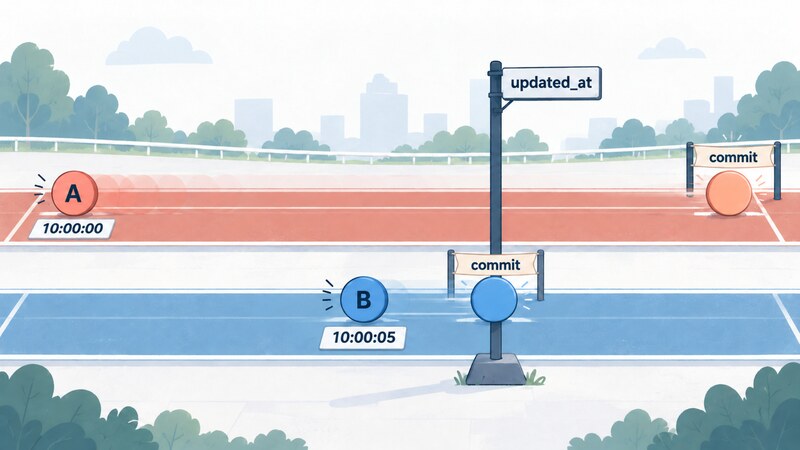
One caveat on this experiment: it ran against SQLite, which serializes writers, so it never actually had two transactions open at once with their commit order swapped. What it reproduced is the order of visibility as the sync job sees it — B appears first, and A shows up later, still carrying an older timestamp. Why that ordering happens for real is explained by combining two facts: now() returns the transaction’s start time, and rows aren’t visible before commit.
A row sitting exactly on the boundary lives or dies by one comparison operator
There’s a second subtlety around how the boundary itself gets handled. Say the watermark has advanced to some timestamp, and a new row then arrives carrying that exact same timestamp. What happens to it?
It depends entirely on which operator you picked. With updated_at > watermark, a row sharing the watermark’s timestamp will never match again. With updated_at >= watermark, nothing gets lost — but you’ll resend rows you already delivered last time.
operator >
  sync #1 -> fetched 5 rows ["r1","r2","r3","r4","r5"]
  sync #2 -> fetched 0 rows []
  sync #3 -> fetched 0 rows []
  table 8 rows / delivered 5 rows / missed 3 rows ["r6","r7","r8"]

operator >=
  sync #1 -> fetched 5 rows ["r1","r2","r3","r4","r5"]
  sync #2 -> fetched 8 rows ["r1","r2","r3","r4","r5","r6","r7","r8"]
  sync #3 -> fetched 8 rows ["r1","r2","r3","r4","r5","r6","r7","r8"]
  table 8 rows / delivered 8 rows / missed 0 rows []
Pick > and some rows never reach the destination again. Pick >= and the same rows keep arriving over and over. So does switching to >= settle it? Not by itself: choosing >= only works if the destination can apply the same row more than once and land in the same state either way — in other words, the apply step has to be idempotent.
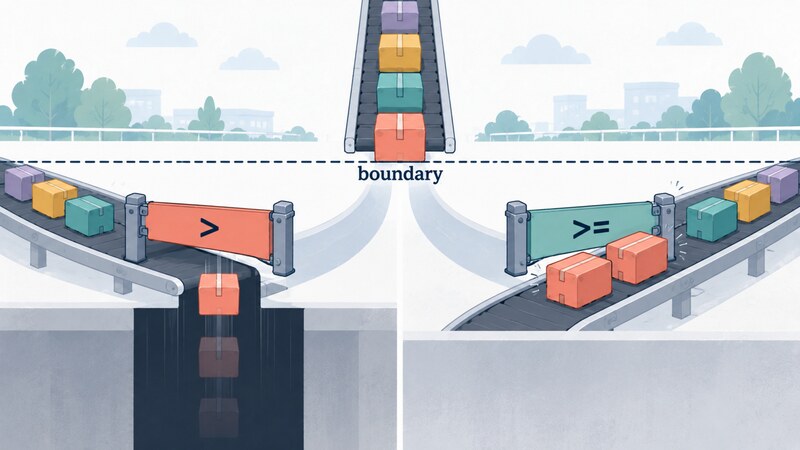
> drops the row sitting on the boundary; >= redelivers itDuplicate timestamps are easier to produce than you’d think
You might assume that two rows landing on the exact same timestamp needs unusually heavy load. Is a shared timestamp really that easy to produce? As a test, 1000 rows were written inside a single transaction.
rows written                       : 1000 / 13 ms
distinct timestamps                : 7
largest group sharing one timestamp: 258 rows
rows sharing the newest timestamp  : 140 rows  (timestamp: 2026-09-13T23:51:05.724Z)
Node.js: v22.12.0 / platform: win32
Node.js’s Date.now() ticks in 1-millisecond steps. If the elapsed time is E milliseconds, the number of distinct timestamps can be at most E + 1. Here the write took 13 ms, so the ceiling was 14 distinct values; the observed count, 7, sits comfortably under that ceiling.
Cramming 1000 rows into only 7 timestamps left the busiest single timestamp holding 258 rows. But the risky group for a sync job isn’t the busiest timestamp — it’s whichever group happens to sit on the boundary, and the boundary always lands on the last group written. So the dangerous set is the 140 rows sharing the newest timestamp. If a sync had run at that exact instant and advanced the watermark to that value, the same > behavior from before would kick in, and every row written after it that happened to share that same timestamp would be dropped as a block.
Keep in mind these numbers come from a single observation, on this machine, at this load, with this clock resolution. Change the hardware, the write rate, or the clock’s tick size, and the numbers move. What doesn’t move is the relationship: whenever write throughput outruns clock resolution, rows sharing a timestamp are guaranteed to pile up.
SQL Server’s datetime type, according to its own documentation, rounds to an even coarser grain.
Rounded to increments of .000, .003, or .007 seconds
Because that grain is coarser than a millisecond, databases using this type will produce shared timestamps even more readily.
Whose clock stamped this row?
Everything so far happened inside a single database. There’s another factor that can shift the boundary further: whether updated_at is stamped by the application server’s clock (something like new Date()) or the database server’s clock (something like now()).
In a setup with two clocks, even a small drift between them makes the boundary less stable still. This article doesn’t put a number on that effect, since the test environment was a single machine. Still, “there may be more than one clock involved” is worth having in mind from the start of a design. Could you say, right now, which clock is stamping your rows?
Deleted rows never enter this query’s field of view
There’s one more thing this pattern fundamentally can’t carry: deletions. Once a row is physically deleted, no query against updated_at will ever surface it again.
sync #1        -> fetched: ["A","B","C"] / destination: ["A","B","C"]
B deleted
sync #2        -> fetched: [] / destination: ["A","B","C"]
sync #3        -> fetched: [] / destination: ["A","B","C"]

source table       : ["A","C"]
destination        : ["A","B","C"]
stray leftover row : ["B"]
B is already gone from the source table, but it’s still sitting in the destination. This lookup pattern has no way of ever learning that B disappeared.
A soft-delete approach — flip a “deleted” flag and bump updated_at — turns the deletion into an update, and updates do flow through. But that only works because it reshapes the delete into an update; the updated_at-based query itself never gained the ability to see deletions.

A map of trade-offs: what each fix costs
Put together, the naive high-water mark has at least three holes: permanent loss from long transactions, ambiguous handling of rows on the boundary, and blindness to deletes. Every fix for these comes with a price tag attached.
| Approach | Survives long transactions | Sees deletes | What the consumer must do | Confirmation level |
|---|---|---|---|---|
Naive > watermark |
No (permanent gap) | No | Nothing special | Measured |
>= watermark |
No (same gap remains) | No | Idempotent apply | Measured |
| Overlapping time window + idempotent apply | Only up to the window width | No | Idempotent apply | Measured |
| Monotonic sequence + “highest value observed” | No (same gap, different shape) | No | Nothing special | From spec |
| Monotonic sequence + “lowest active value” | Yes | No | Nothing special | From spec |
| Change feed (e.g. logical replication) | Yes | Yes | Must be able to consume a feed | Not verified — design only |
Overlapping windows only postpone the miss
The cheapest mitigation is an overlapping time window: rewind a little before the watermark and re-read from there. Rewind N seconds and every transaction shorter than N is guaranteed to fall inside the window.
overlap 60s / transaction length 20s (starts 10:00:00, commits 10:00:20)
  sync #1 -> ["B"] / watermark: 2026-09-14T10:00:05.000Z
  A is only 5s older than the watermark -> inside the window
  sync #2 -> ["A","B"]
  missed: [] / 0

overlap 60s / transaction length 90s (starts 09:58:35, commits at or after 10:00:05)
  sync #1 -> ["B"] / watermark: 2026-09-14T10:00:05.000Z
  A is 90s older than the watermark -> outside the window
  sync #2 -> ["B"]
  missed: ["A"] / 1
With a 60-second overlap against a 20-second transaction, nothing was missed. Against a 90-second transaction, one row was missed. So the window doesn’t eliminate the miss — it just postpones it. The window width is, in effect, a declaration: “I will not tolerate transactions longer than this.”
There’s a second thing worth not missing here: B was delivered a second time on the second sync. As long as you use a window, redelivering the same row is unavoidable, so the consumer has to apply the same row more than once and land in the same state either way.
And the wider the window, the more you re-read on every single run. “Just in case, let’s make the window bigger” is a knob that can be turned indefinitely, and turning it too far quietly walks your lightweight incremental sync back toward a full-table sync — it isn’t a dial you can crank without first deciding how much re-reading you’re willing to accept.
Switching to sequence numbers doesn’t help if you still take “the highest value observed”
Some people reach for a monotonically increasing sequence instead of a timestamp. SQL Server’s rowversion type, per its own documentation, isn’t a time value at all — it’s simply an ever-increasing counter, scoped to the database.
The rowversion data type is just an incrementing number and does not preserve a date or a time. … This tracks a relative time within a database, not an actual time that can be associated with a clock.
A sequence never repeats a value across two rows, and clock resolution stops mattering, so the whole > versus >= boundary problem disappears. But does switching to a sequence alone actually fix the long-transaction problem?
The same trap reappears in a different shape. If you take “the largest sequence value observed so far” as the next watermark, you will still permanently miss any transaction that hasn’t committed yet but is holding a smaller value. Microsoft’s own documentation names this trap directly.
If an application uses @@DBTS rather than MIN_ACTIVE_ROWVERSION, it is possible to miss changes that are active when synchronization occurs.
@@DBTS is the highest sequence value the database has handed out so far — exactly “the largest value observed.” Using it as your watermark reproduces the same permanent miss that long transaction A caused earlier. MIN_ACTIVE_ROWVERSION() does the opposite: it returns the smallest sequence value currently held by a transaction that hasn’t committed yet. Anchor your next watermark to that value, and you never advance past a transaction that’s still in flight.
In other words, a sequence-based approach becomes safe not because it replaced the clock, but because it switched from “the highest value observed” to “the lowest active value.” Miss that distinction, and swapping out the clock buys you nothing: the exact same hole stays open, just wearing different clothes. This paragraph is a synthesis of the official documentation; it was not reproduced against a live SQL Server instance.
Going one step further, a change feed — reading a database’s own write log forward, instead of re-querying a snapshot after the fact — can track both commit order and deletions directly from the record of writes itself. This article doesn’t get as far as verifying its concrete behavior, though; it stops at outlining what such a design guarantees.
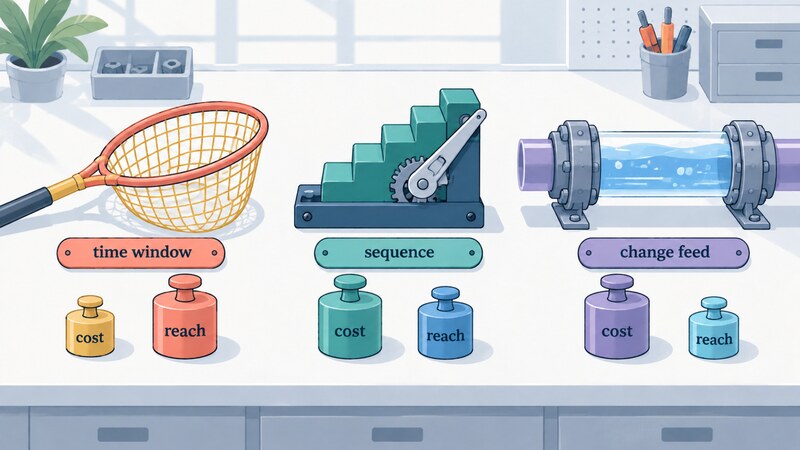
What this article verified, and what it didn’t
Every measured result in this article came from hands-on testing with Node.js v22.12.0 (win32) and Node’s built-in experimental SQLite module (node:sqlite). No external libraries were involved.
PostgreSQL’s now() behavior, SQL Server’s datetime rounding, and the properties of rowversion and MIN_ACTIVE_ROWVERSION() are all cited directly from official documentation; none of them were reproduced against a live instance. The scenario where an application server and a database server have drifting clocks also wasn’t measured, since the test environment was a single machine.
The count of rows sharing one timestamp (140) is a single observation from this test environment under this load. Read it not as a number to expect elsewhere, but as evidence for a general relationship: whenever write throughput outruns clock resolution, shared timestamps pile up.
Counting rows can’t prove zero rows were missed
One last point, about how these checks were actually done. Every experiment above compared the set of IDs delivered to the destination against the set of IDs in the source table, and looked at the difference — never just a row count.
That’s because matching counts lie easily. Miss one row and double-count a different one, and the totals line up by coincidence. A sync run that delivered nothing at all can still show matching counts on both sides, if the two sides already happened to match beforehand. Look only at counts, and both of those failures read as “all clear.”
What you actually want to know isn’t “how many rows arrived” — it’s “which IDs never arrived.” Every run, diff the set of IDs that should be in range on the source against the set of IDs actually delivered. That’s the exact technique used throughout this article’s experiments, and it drops straight into any sync job you already have.
Borrow the boundary from inside the data that boundary is meant to slice, and the boundary will bend whenever the data feels like it. Keep the ruler outside the thing you’re measuring. Verify with set differences, not row counts. Those two habits are worth carrying into any sync implementation you build.
Primary sources referenced
- PostgreSQL official documentation — Date/Time Functions and Operators (used for:
now()/CURRENT_TIMESTAMPreturning the transaction’s start time, and howclock_timestamp()differs) - datetime (Transact-SQL) — Microsoft Learn (used for: SQL Server’s
datetimetype rounding to.000/.003/.007second increments) - rowversion (Transact-SQL) — Microsoft Learn (used for:
rowversionbeing a monotonic counter rather than a time value) - MIN_ACTIVE_ROWVERSION (Transact-SQL) — Microsoft Learn (used for: why anchoring on
@@DBTScan miss changes still active at sync time)