
Can React Talk to an MCP Server Directly?
Part 4 of 6: crossing an origin, reading SSE from the browser, and why cancellation doesn't always stop the work

This is part 4 of a six-part series called “Building an MCP Client in React.” Part 1 established that MCP connects a host, a client, and a server over JSON-RPC 2.0. Part 2 measured, from Node.js, how those three actually talk over a single Streamable HTTP POST, and closed by flagging that a browser hitting that same endpoint directly would run into a CORS preflight first — a thread we pick up here. Part 3 covered how the server side designs its Tools and Resources. This part turns to the piece a user actually sees: the React code running inside the browser.
The running example hasn’t changed. A user types a natural-language question into a text box — something like “show me the top 10 products by revenue last month” — the app turns that into SQL through an LLM API call, sends it to a database’s MCP server, and renders the result as a table. This part asks whether the “talk to the MCP server” step of that flow can be written directly in React code. Short answer: no. Chasing down why turned up a second, easy-to-miss trap: work started on the server can keep running even after the user closes the browser tab.
Crossing an Origin
A few terms recur through this article, worth pinning down first.
An origin is the unit determined by a scheme (http or https), a hostname, and a port number. http://127.0.0.1:3601 and http://127.0.0.1:3602 share a hostname but differ in port, so a browser treats them as two different origins.
Browsers enforce a baseline rule called the same-origin policy. By default, JavaScript running on a page can only freely read responses from its own origin. This is the browser’s own defense against, for example, a malicious page on some other site silently firing requests at a service you’re logged into elsewhere and exfiltrating your data.
CORS (Cross-Origin Resource Sharing) is the mechanism that relaxes that policy on a case-by-case basis. If the server includes a response header meaning “requests from this origin are allowed” (Access-Control-Allow-Origin, among others), the browser permits the cross-origin read. Put the other way around: if the server sets nothing, cross-origin access is denied by default.
There’s a further wrinkle for POST requests that carry a header like Content-Type: application/json: CORS doesn’t classify them as a “simple request.” The Fetch standard spells out exactly when a Content-Type counts as CORS-safe (safelisted):
If mimeType’s essence is not “application/x-www-form-urlencoded”, “multipart/form-data”, or “text/plain”, then return false.
Any other Content-Type on a POST falls outside that safelist, and before the browser sends the real request, it first sends an OPTIONS preflight request to check. The JSON-RPC request part 2 sent used Content-Type: application/json, so it falls under this rule too.
One more term: a BFF (Backend For Frontend). That’s a small relay server standing at the same origin as the page itself; the browser talks only to that relay, and the relay makes the real cross-origin request itself, server to server. CORS is a constraint the browser — the client — enforces; it has no bearing on one server calling another. That’s exactly why this construction works.
Measured: A Direct Call Stops, a Same-Origin Relay Gets Through
Everything below comes from Node.js v22.12.0, the official TypeScript SDK (@modelcontextprotocol/sdk) at version 1.30.0, Chrome, run on 2026-08-06. We stood up two origins for this. One is the MCP server itself (with no CORS-related headers attached at all); the other is the origin serving the page, with a same-origin relay mounted at /bff. Alongside the echo tool used in earlier parts, we registered two minimal tools that count while reporting progress — one that never looks at the cancellation signal, one that does. The latter stands in for the running example’s “report progress while running a large SQL query.”
Straight to the Other Origin
From the browser page, we tried POSTing directly to the MCP server’s endpoint.
const BODY = { jsonrpc: '2.0', id: 1, method: 'tools/call', params: { name: 'echo', arguments: { text: 'hello' } } };
const HEADERS = { 'Content-Type': 'application/json', Accept: 'application/json, text/event-stream' };

// 1) straight to the cross-origin MCP endpoint
await fetch('http://127.0.0.1:3601/mcp', { method: 'POST', headers: HEADERS, body: JSON.stringify(BODY) });
What showed up in Chrome’s console (pasted verbatim).
[error] Access to fetch at 'http://127.0.0.1:3601/mcp' from origin 'http://127.0.0.1:3602' has been blocked by CORS policy: Response to preflight request doesn't pass access control check: No 'Access-Control-Allow-Origin' header is present on the requested resource.
[error] Failed to load resource: net::ERR_FAILED
[log] DIRECT threw: TypeError: Failed to fetch
What stops this is the preflight step. Notice the phrase preflight request in the error text. Before sending the real POST, the browser sends an OPTIONS preflight, and because the reply carried no Access-Control-Allow-Origin, the browser blocks the real request outright. The MCP server’s own code is never reached. As part 2 established, this SDK’s responses carry no CORS headers at all, and OPTIONS returns 405. In other words, this failure sits on a layer entirely separate from how carefully a server validates Origin — the browser’s own CORS mechanism stops it first. Even a server that validates Origin strictly would still get blocked here the same way, as long as it isn’t returning CORS allow headers.
Through a Same-Origin Relay (a BFF)
From the same page, we sent the identical payload to the same-origin /bff instead.
// 2) through the same-origin relay
await fetch('/bff', { method: 'POST', headers: HEADERS, body: JSON.stringify(BODY) });
[log] BFF ok status=200 content-type=text/event-stream; charset=utf-8
[log] BFF body=event: message
data: {"result":{"content":[{"type":"text","text":"hello"}]},"jsonrpc":"2.0","id":1}
[log] DONE
It came back 200, and the tool ran. /bff sits at the same origin as the page as far as the browser is concerned, so CORS simply doesn’t come into play. The relay itself, acting as a server, makes the request to the cross-origin MCP endpoint — and that path is entirely outside the browser’s CORS enforcement.
This relay is a minimal setup, built only to test with. It has no authentication, no authorization, no rate limiting, and no timeout handling. It isn’t presented here as a production shape — it exists only as a base for confirming CORS behavior and the sequential-read behavior covered next.

The Relay Must Not Buffer
One implementation caveat worth inserting here. Get the relay’s shape wrong and everything above stops mattering. If the relay is written to fully receive the MCP server’s response before forwarding it — something like await upstream.text() — the SSE stream loses the property that made it useful, delivering data the moment it arrives, and every event lands bunched together at the end instead. This is easy to miss, since the status code and the overall response shape don’t visibly change, but the real-time progress notifications covered next depend entirely on getting this right. A relay needs to stream the bytes it receives straight through to the browser, without holding them back.
Reading SSE Sequentially in the Browser — Progress and Result Share One Pipe
fetch‘s response.body is a ReadableStream, something you can pull chunks out of one at a time. Reading the relay’s response as this kind of stream, cutting it into frames at blank lines (SSE’s event separator), and timestamping each arrival looks like this.
const reader = res.body.getReader();
const dec = new TextDecoder();
let buf = '';
for (;;) {
  const { done, value } = await reader.read();
  if (done) break;
  buf += dec.decode(value, { stream: true });
  let i;
  while ((i = buf.indexOf('\n\n')) !== -1) {
    events.push({ atMs: Date.now() - t0, frame: buf.slice(0, i) });
    buf = buf.slice(i + 2);
  }
}
We called the counting tool with steps: 5 and a _meta.progressToken, so it reports progress five times along the way. Here’s what actually arrived, timestamps included (pasted verbatim).
 956ms  event: message
        data: {"method":"notifications/progress","params":{"progressToken":"p1","progress":1,"total":5,"message":"step 1"},"jsonrpc":"2.0"}
1655ms  event: message
        data: {"method":"notifications/progress","params":{"progressToken":"p1","progress":2,"total":5,"message":"step 2"},"jsonrpc":"2.0"}
2361ms  … progress 3
3070ms  … progress 4
3783ms  … progress 5
3784ms  event: message
        data: {"result":{"content":[{"type":"text","text":"counted to 5"}]},"jsonrpc":"2.0","id":1}
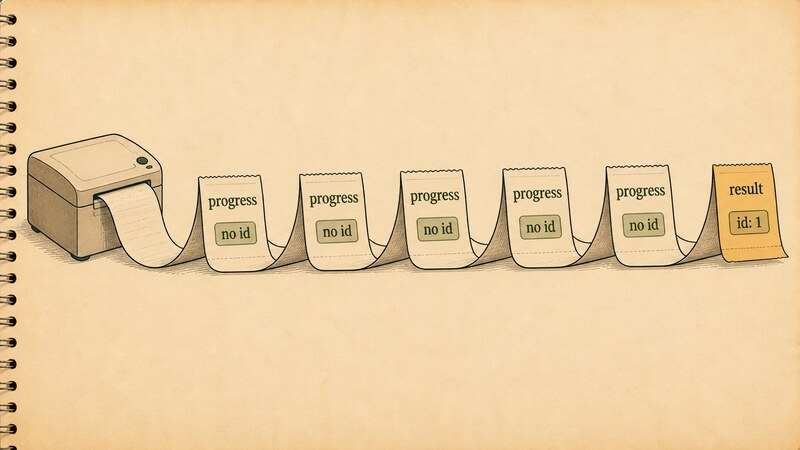
Five progress notifications arrive first, roughly 0.7 seconds apart, and the final response comes last. The spec states what a server is allowed to send over an SSE response stream:
The server MAY send JSON-RPC notifications — for example, notifications/progress or notifications/message — before the final response. These notifications MUST relate to the originating client request.
What we measured matches that. On the progress token specifically, the spec also requires it be a string or integer and be unique across live requests.
The receiving side can sort these by whether id is present. A JSON-RPC notification (notifications/progress) carries no id. The final response — the last entry in the log above — is the only one carrying id: 1. The same stream mixes two kinds of message with different natures: progress notifications and the final response, so the browser side needs to sort them by whether id is present. Mapped onto the running example: while a large SQL query is running, show “N rows processed so far” as progress arrives, and feed only the final response into the results table.
The Cancellation Trap: Work Can Outlive the Tab
This is the article’s easiest thing to get wrong.
Client-side interruption itself behaves exactly as you’d expect. Aborting fetch with AbortController after 2.5 seconds produced this.
outcome: "AbortError: BodyStreamBuffer was aborted"
framesReceived: 3
The client side threw after receiving three frames and stopped waiting. So far, no surprises.
The server side is where it gets interesting — and where mixing up spec revisions leads to a wrong reading. The 2026-07-28 revision of Streamable HTTP states plainly that closing the SSE response stream is a cancellation signal.
Closing the SSE response stream MUST be treated by the server as cancellation of that request. Because each request has its own response stream, the transport-level disconnect is unambiguous. The server SHOULD stop work on the cancelled request as soon as practical and MUST NOT send any further messages for it.
That, though, is 2026-07-28 text. As part 1 established, the official TypeScript SDK we’re testing (1.30.0) implements protocol revisions only up through 2025-11-25 — and that revision says the opposite:
Disconnection SHOULD NOT be interpreted as the client cancelling its request. To cancel, the client SHOULD explicitly send an MCP
CancelledNotification.
In other words, the MUST that says “closing the stream equals cancellation” belongs to a future revision this SDK doesn’t target, and the revision it actually implements states the reverse.
Even so, testing it directly: with the handler that never checks the cancellation signal (a ten-step counter), the transport layer still detected the disconnect (server log, pasted verbatim).
[server] slow_count step 1/10
[server] slow_count step 2/10
[server] slow_count step 3/10
[bff] downstream closed early -> aborting upstream
[bff] streaming stopped: AbortError
[server] response closed (client disconnect or normal end)
[server] slow_count step 4/10
[server] slow_count step 5/10
[server] slow_count step 6/10
[server] slow_count step 7/10
[server] slow_count step 8/10
[server] slow_count step 9/10
[server] slow_count step 10/10
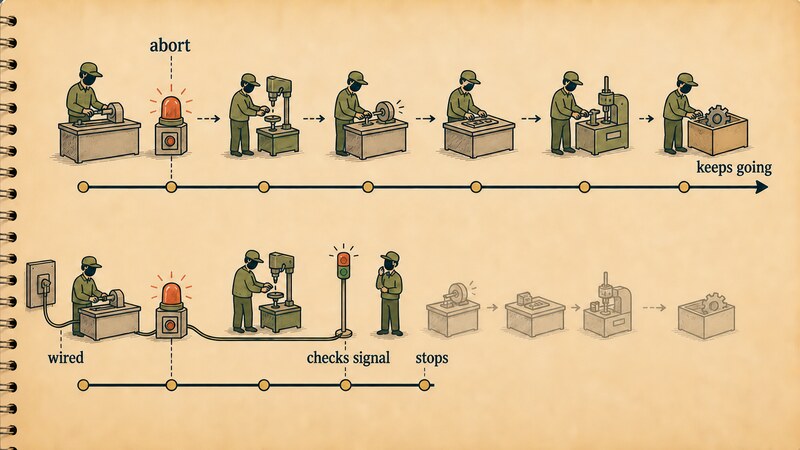
A response closed line does appear. So the transport layer recognizes the disconnect itself, even with no explicit notification like CancelledNotification ever sent. But the tool handler ran all the way through, to step ten. Whether this happens because the SDK is following the 2025-11-25 SHOULD NOT to the letter, or simply because it doesn’t auto-stop the handler for some unrelated reason, isn’t something we’re prepared to assert without reading the source. What’s solid is this: the assumption that “the spec says MUST, so the implementation must behave that way” doesn’t hold here. This series has repeated one discipline since part 1 — keep where the spec currently stands separate from what you can actually write today — and cancellation is one more place that applies.
Cancellation is cooperative. A handler is just an ordinary JavaScript function. Nothing forcibly terminates it from the outside; it only stops once it checks for itself whether it’s been interrupted. That’s a more general property of AbortController itself. The DOM standard says this about AbortSignal:
Changes to an AbortSignal object represent the wishes of the corresponding AbortController object, but an API observing the AbortSignal object can choose to ignore them.
Our slow_count handler never once looked at extra.signal, so it kept ignoring that expressed intent the entire time.
Switch to the version that only adds a check on extra.signal, and behavior changes.
async ({ steps }, extra) => {
  for (let i = 1; i <= steps; i++) {
    await new Promise(r => setTimeout(r, 700));
    if (extra && extra.signal && extra.signal.aborted) {
      throw new Error('cancelled');
    }
    // …
  }
}
[server] slow_count_cancellable step 1/10
[server] slow_count_cancellable step 2/10
[server] slow_count_cancellable step 3/10
[bff] downstream closed early -> aborting upstream
[bff] streaming stopped: AbortError
[server] response closed (client disconnect or normal end)
[server] slow_count_cancellable ABORTED at step 4/10
This one stops at step four. Taken alone, this reads as “checking extra.signal.aborted is all it takes” — but that wasn’t the whole story.
We took the exact same signal-checking handler and mounted it on two routes that differed only in their wiring. One route wired res.on('close', () => { transport.close(); mcp.close(); }) — calling transport.close() when the connection closes — and the other didn’t. Both were disconnected from the client side 1.8 seconds in (pasted verbatim).
########## A: wired — res.on('close') present ##########
[wired] step 1/10
[wired] step 2/10
[wired] step 3/10

>>> client destroys the connection for /wired
[wired] ABORTED at step 4/10

########## B: unwired ##########
[unwired] step 1/10
[unwired] step 2/10
[unwired] step 3/10

>>> client destroys the connection for /unwired
[unwired] step 4/10
[unwired] step 5/10
[unwired] step 6/10
[unwired] step 7/10
[unwired] step 8/10
[unwired] step 9/10
[unwired] step 10/10
The handler code is identical between the two routes. The only difference is whether the wiring connects the disconnect to transport.close(). Without that wiring, the handler’s extra.signal check does nothing, because that signal itself never gets aborted, so the handler runs to the very end. So: making cancellation actually take effect requires both the wiring that connects disconnection to transport.close(), and the handler checking extra.signal. Neither one alone is enough. Mapped onto the running example: even if a user closes the tab thinking “I don’t need the result anymore,” a long-running SQL query may keep running behind the scenes unless both of these pieces are in place.

Who Obtains Consent, and Where Should the API Key Live?
Both measurements above feed straight into design decisions.
Any JavaScript that reaches the browser can, if someone’s determined enough, be read through devtools or the network tab. Bake a long-lived secret like an API key directly into browser-side code or configuration, and it stops being a secret. A relay (BFF) isn’t only for working around CORS — it also gives you a place to keep that kind of secret outside the browser.
That leaves the separate question of who obtains consent. The spec’s Security section states a set of principles.
Hosts must obtain explicit user consent before invoking any tool Users should understand what each tool does before authorizing its use
The same section states an equivalent principle for data.
Hosts must obtain explicit user consent before exposing user data to servers Hosts must not transmit resource data elsewhere without user consent
As part 1 established, a host is the application that faces the user directly and initiates the connection. In the running example, the React app running in the browser is that host. So the UI that asks “okay to run this tool?” needs to live inside the host — inside the browser, in front of the user — and that’s the React side’s job. Once consent is granted, actually talking to the MCP server, and managing the credentials that requires, belongs outside the browser: on the relay. Where consent is obtained and where secrets are kept need to be deliberately separated in the design — that’s what these measurements and the spec’s principles add up to together. The relay tested in this article doesn’t implement this consent flow or key management itself. It’s the minimal foundation confirming that CORS and sequential reads work at all; what gets built on top of it is a separate piece of design work.

State Design on the React Side (A General Sketch)
Here’s how the findings above translate into React-side implementation, as a general sketch. This section wasn’t verified against an actual React implementation — it’s written as general design guidance.
- In-flight display: send the request with a
_meta.progressTokenattached, and reflect theprogress,total, andmessagefields from eachnotifications/progressyou receive into state. That gets you a progress bar or a “processing item N” display. - Cancellation: a cancel button that calls
AbortController.abort()can stop the client-side display on its own. But as measured above, the server-side work itself only stops if both the wiring that connects disconnection totransport.close()and the handler’sextra.signalcheck are in place. Showing “cancelled” in the UI and the server having actually stopped are two separate facts, and they need to be tracked as such. - Rendering the results table: only messages carrying an
idshould be treated as the final result and fed into the table. Notifications without anidshould update the progress display only, never the table.
What’s Coming Next
Here’s where the threads we didn’t pull on this time get picked up.
| Left for later | Where |
|---|---|
Asynchronous execution through the Tasks extension, tasks/cancel, and long-lived subscriptions/listen streams | Part 5 |
| Authorization design, legacy/modern dual-era error compatibility, whether it’s safe to just run generated SQL | Part 6 |
Wrapping Up
React running in a browser can’t fetch a cross-origin MCP server directly. A POST using Content-Type: application/json doesn’t qualify as a CORS simple request, so it’s stopped by the browser itself at the preflight stage, before the server’s own code is ever reached. Route it through a same-origin relay instead and it goes through with 200 — but only if the relay streams straight through instead of buffering, since buffering destroys SSE’s sequential delivery. Read response.body in the browser as a ReadableStream, and progress notifications and the final response turn out to share the same stream, sortable by whether id is present. And the biggest trap turned out to be that cancellation is cooperative. Aborting with AbortController does get the disconnect all the way to the server’s transport layer, but work runs to completion unless both the wiring that connects disconnection to transport.close() and the tool handler’s own extra.signal check are in place. The 2025-11-25 revision this SDK implements states that disconnection shouldn’t even be read as cancellation in the first place, so the 2026-07-28 MUST can’t be used to describe how this implementation actually behaves. Even so, the most practical lesson from these measurements stands: closing a browser tab doesn’t mean the server-side work stops. Where consent gets obtained and where secrets get stored both need to be designed with that fact in mind. Next time, we dig into asynchronous execution and cancellation through the Tasks extension.
Articles in This Series
Read from Part 1 and the series runs as one line, from mapping the spec to code that runs in a browser. Each part also stands on its own, so jump around from here whenever you want to.
- Part 1: Where Does the MCP Client Actually Live? — host, client, and server, and the legacy-to-modern fault line
- Part 2: What Does an MCP Server Actually Listen For? — required Streamable HTTP headers, SSE, and Origin validation
- Part 3: What Does an MCP Server’s Counter Actually Hand You? — schemas, annotations, and the two ways a call fails
- Part 4: Can React Talk to an MCP Server Directly? (this article) — CORS, a BFF, reading SSE, and cooperative cancellation
- Part 5: How Does MCP Handle Work You Can’t Wait For? — progress notifications, subscriptions, and the Tasks extension
- Part 6: Whose Job Is It to Open That Door? — authorization, legacy/modern detection, and running generated SQL
Primary Sources
- Streamable HTTP (2026-07-28) — the Origin validation requirement under Security & Endpoint, how notifications are sent over an SSE response, the Cancellation section text
- Transports (2025-11-25) — how disconnection is handled in the revision the tested SDK actually implements, the “Disconnection SHOULD NOT be interpreted as cancelling” text
- Progress (2026-07-28) —
progressTokenrequirements, how progress notifications are delivered - MCP Specification (latest) — the Security and Trust & Safety section, the principles governing user consent and data privacy
- Fetch Standard — the definition of a CORS-safelisted request header, when
Content-Typecounts as a simple request - Streams Standard — the definition of
ReadableStream - DOM Standard — the definitions of
AbortController/AbortSignal, including the note that a signal can be ignored