

What Does Jev’s Confidence of 0.9 Actually Measure? (Series Part 3)
Confidence is the distance traveled from a pure guess toward certainty, not the top probability itself, and adding options can move the probabilities. Read through the published formulas and live measurements
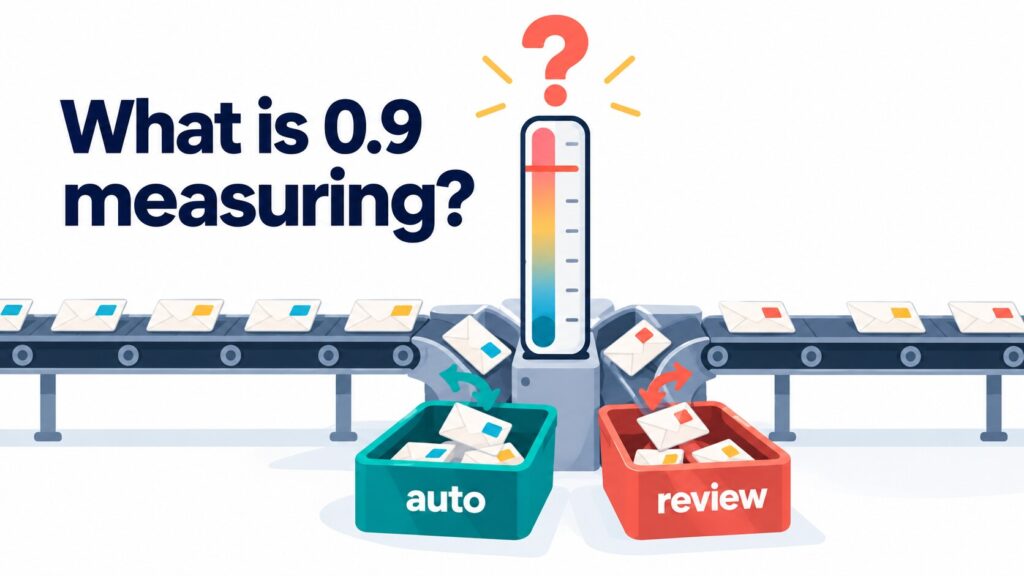
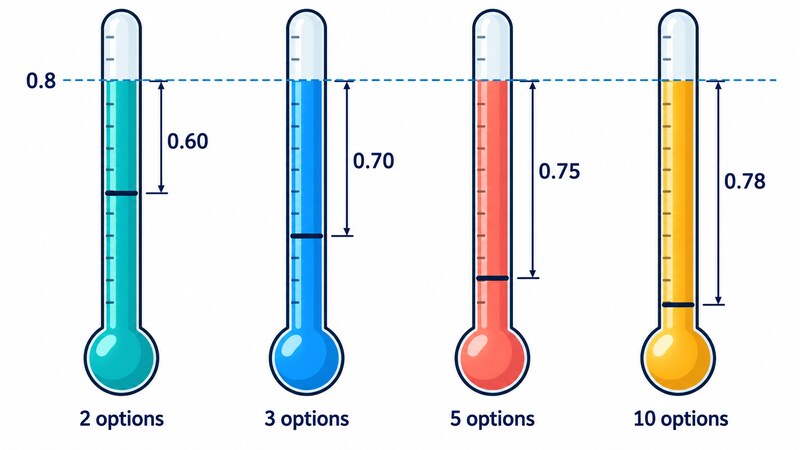
The same top probability of 0.8 can give a confidence anywhere from 0.60 to 0.78, depending on the number of options. Confidence is not the top probability itself. It measures how far an answer has traveled on the road from a pure guess to certainty.
Say you want an AI to read incoming support messages and route each one to the right team. The first rule most of us write looks like this: if the confidence returned by the AI is 0.9 or higher, process the message automatically; otherwise, hand it to a person.
// illustrative sketch
if (answer.confidence >= 0.9) autoRoute(answer.choice);
else sendToHuman(message);
That 0.9 is a threshold: the cutoff number that splits “handle automatically” from “send to a human”. But what is that 0.9 actually measuring?
This article calls the API of Jev, a classification model published by TypeSafe AI, and checks what confidence is computed from and what it ignores. There are a few formulas, and each comes with a worked example and a one-line plain-language version. You do not need a statistics background.
Jev in a few minutes: typed answers and probabilities, not prose
Jev does not write sentences. You give it a piece of text to judge (state) and one or more questions, and it returns an answer of the right type, together with probabilities, as JSON. There are three question types:
- Choice: pick one option from a list (example: which team should handle this?)
- Score: place the text on a numbered scale (example: how frustrated is the writer, from calm to a bit annoyed to very annoyed?)
- Noul: answer with a single probability that the statement is true (example: is the writer asking for a refund?)
Here is one call that asks all three at once. The message is fictional, written for this article.
import { choice, noul, score, TypeSafeClient } from "@typesafe-ai/sdk";

const client = new TypeSafeClient({ apiKey: process.env.JEV_API_KEY });
const { answers, model } = await client.systemOne({
  state: "API responses suddenly started taking over 10 seconds. Could this be a billing issue?",
  questions: {
    team: choice("Which team should handle this?", {
      billing: "payments and plans",
      technical: "bugs and integrations",
      sales: "pricing and accounts",
    }),
    frustration: score("How frustrated is the writer?", ["calm", "a bit annoyed", "very annoyed"]),
    refund: noul("The writer is asking for a refund"),
  },
});
The answers came back like this (the model was jev-1.13.0; the per-level labels in legend are omitted).
{
  "team": {
    "type": "choice", "choice": "technical", "confidence": 0.95,
    "probabilities": { "billing": 0.03, "technical": 0.97, "sales": 0 }
  },
  "frustration": {
    "type": "score", "score": 0.82, "confidence": 0.7,
    "probabilities": { "0": 0.19, "1": 0.8, "2": 0.01 }
  },
  "refund": { "type": "noul", "noul": 0.05 }
}
Choice and Score answers carry a list of probabilities (probabilities) and a confidence that boils them down to one number. Noul has no confidence. There is a reason for that, which comes later.
Choice confidence: how far the answer sits above a pure guess
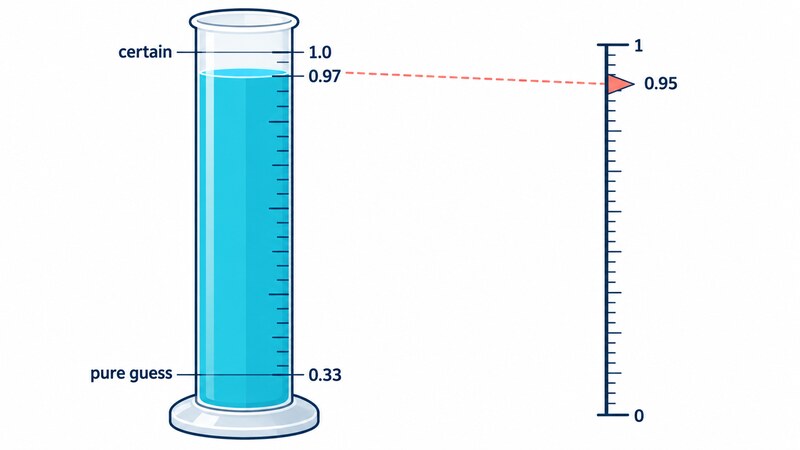
Start with Choice. In the output above, technical has a probability of 0.97, yet the confidence is 0.95. Why is it not simply 0.97?
The official documentation publishes the formula. Here n is the number of options and p is the top probability.
confidence = (p − 1/n) / (1 − 1/n)In plain words: call a pure guess (the same probability on every option) 0, call certainty 1, and ask where the top probability falls on that road. With three options, a pure guess is 1/3 each, about 0.33, so the formula stretches the road from 0.33 to 1 onto a scale from 0 to 1.
Here is the hand calculation for team, with n = 3 and p = 0.97: (0.97 − 0.333) ÷ (1 − 0.333) = 0.637 ÷ 0.667 ≈ 0.955. The API returned 0.95, so they agree. The small gap, at most 0.005, appears because the API rounds the probabilities it returns to two decimals, while confidence seems to be computed from the unrounded values.
Does the published formula really match what the server returns? I sent 8 fictional messages, each with 9 questions (Choice questions with 2, 3, 5, 7 and 10 options, Score questions with 3, 4 and 5 levels, and one Noul question), and recomputed the 64 Choice and Score answers from the probabilities that came back. All 64 were within 0.015 of the returned confidence, and the largest gap was 0.005. After rounding to two decimals, 60 of 64 matched exactly, and the remaining four differ only by rounding.
This confirms only that the published formula reproduces what I observed. The server’s internals are not public, so I cannot verify that it computes confidence this way.
Pitfall 1: the same 0.9 needs a different top probability for different option counts
Look at the 1/n in the formula. It means confidence re-draws the “pure guess” line according to the number of options n. The meaning, “what fraction of the road from a pure guess to certainty”, is the same for every n. But it does not map one-to-one onto the top probability.
Suppose the top probability is 0.8 in every case, with the remaining 0.2 split evenly among the other options. Then confidence comes out like this:
| Number of options | 2 | 3 | 5 | 10 |
|---|---|---|---|---|
| confidence | 0.60 | 0.70 | 0.75 | 0.78 |
Turn it around and ask what top probability you need to reach a confidence of 0.9. The answer is 0.95 with 2 options, 0.93 with 3, 0.92 with 5 and 0.91 with 10. So the same “0.9 or higher” asks for a top probability between 0.91 and 0.95, which moves a little. The official documentation also says that if you threshold on the top probability itself, its meaning depends on the number of options, so you should set the threshold per question.
A top probability is also not the same as how often the answer is right. It is how strongly the model leans, and this article does not measure how often those leanings are correct.
There is one more easy-to-miss point. Choice confidence looks only at the top probability. It does not care how the runners-up are split.
Take three options with a top probability of 0.6, and vary how the rest is divided:
| Probabilities | confidence |
|---|---|
| 0.6 / 0.4 / 0 | 0.40 |
| 0.6 / 0.2 / 0.2 | 0.40 |
| 0.6 / 0 / 0.4 | 0.40 |
The first row is “torn between two candidates” and the second is “the rest is scattered”, but confidence cannot tell them apart. The official documentation lists two alternatives: the top probability itself, and the ratio of the first place to the second place (p_max ÷ p_second). When a decision comes down to the top two candidates, that ratio is the one that helps.
Pitfall 2: adding options can move the probabilities themselves
The next one is trickier. If only the 1/n changed, you could compensate by calculation. But adding options sometimes moves the probabilities themselves.
I asked about the same message twice in one call: once with the 3 teams above, and once with 3 more clearly unrelated options added (“legal and contract review”, “hiring and HR” and “office facilities”). My expectation beforehand was that the probabilities would barely move and confidence would rise a little. Because both questions were asked in the same call, I have not ruled out that they influenced each other.
For 2 of the 3 messages, that expectation held: the probabilities stayed about the same and confidence moved by 0.01 or less. For “I’d like to add three more users.”, the expectation failed.
| 1st place | Top probability | 2nd place | confidence | |
|---|---|---|---|---|
| 3 options | pricing and accounts | 0.56 | payments and plans 0.35 | 0.34 |
| 6 options | payments and plans | 0.36 | hiring and HR 0.27 | 0.23 |
Simply adding unrelated options changed the winner from “pricing and accounts” to “payments and plans”. I ran it twice, and the winner was the same both times (in the second run its probability was 0.35, with “hiring and HR” at 0.25 in second place). The ratio of first to second shrank from about 1.6 (0.56 to 0.35) with 3 options to about 1.33 (0.36 to 0.27) with 6.
I have not checked why this happens. What I can say is this: adding options can move the probabilities themselves, so a threshold you chose before adding them cannot simply be reused. When you add or remove options, set the threshold again.

Score confidence: information separate from the score
Now Score. A Score question answers on numbered levels 0, 1, 2 and so on. The frustration question above has three levels (0 calm, 1 a bit annoyed, 2 very annoyed), and returned a score of 0.82 and a confidence of 0.7.
The score is each level’s number multiplied by its probability, then added up, in other words a probability-weighted average (statisticians call it the expected value). The probabilities for frustration are 0.19 / 0.8 / 0.01, so 0×0.19 + 1×0.8 + 2×0.01 = 0.82, which matches the returned value. Across the 24 Score answers in the 64, score matched this calculation within two-decimal rounding (at most 0.01).
So what is confidence here? The published formula is:
confidence = 1 − (probability-weighted average distance from the most likely level)
                 ÷ (average distance from the middle level when every level has the same probability)
(if the result is negative, use 0)
In plain words: how tightly is the answer bunched around its most likely level? The divisor describes a completely unbunched state, where every level has the same probability, and the formula asks how much more tightly bunched the actual answer is. Because that even state has no single most likely level, the middle level is used as its reference point.
Here is the hand calculation for frustration.
The most likely level is 1. The distance from it is 1 for level 0 (probability 0.19) and 1 for level 2 (probability 0.01), so the weighted distance is 0.19×1 + 0.01×1 = 0.20. When every level has the same probability, the average distance from the middle level is (1+0+1)÷3 = 2/3. So 1 − 0.20 ÷ (2/3) = 0.70, which matches the returned 0.7.
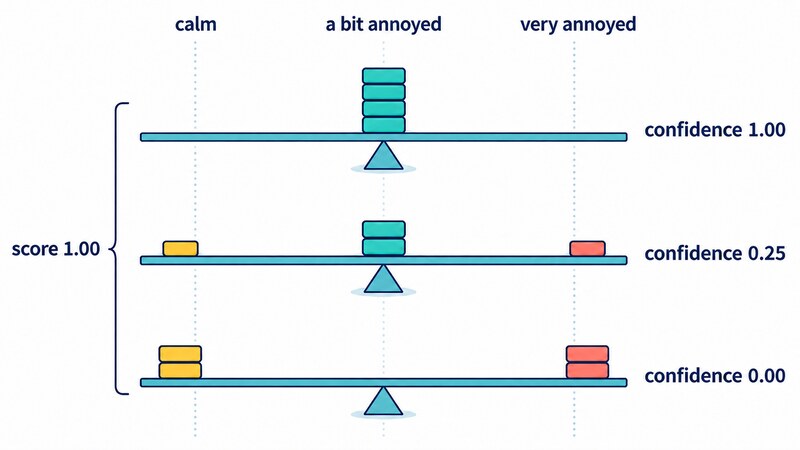
What matters is that score and confidence are different pieces of information. Compare three ways the probability can be distributed over the levels, all with a score of exactly 1.00:
| Probabilities (levels 0 / 1 / 2) | score | confidence |
|---|---|---|
| 0 / 1 / 0 | 1.00 | 1.00 |
| 0.25 / 0.5 / 0.25 | 1.00 | 0.25 |
| 0.5 / 0 / 0.5 | 1.00 | 0.00 (computed by the formula) |
For the third row, take level 0 as the most likely level (the tie goes to the lower number; level 2 would give the same distance of 1.0). The weighted distance is 0.5×0 + 0×1 + 0.5×2 = 1.0, so 1 − 1.0 ÷ (2/3) = −0.5, and a negative result becomes 0.
The third row is split half and half between “calm” and “very annoyed”, yet the average lands on “a bit annoyed” at 1.00. If you looked only at score, you would never see that split. A confidence of 0 is what tells you the average is not to be trusted.
Note also that the Score formula lowers confidence less when probability sits on a level next to the most likely one than when it sits far away. Being torn between “a bit annoyed” and “very annoyed” is treated as better than being torn between “calm” and “very annoyed”.
Why Noul has no confidence
A Noul answer contains only type and noul (the probability of “yes”). Why is there no confidence?
Because the probability itself already expresses the doubt. A value near 0.5 means the model is torn, and a value near 0 or 1 means it is sure. In the earlier output, refund is 0.05, so the model is quite sure the writer is not asking for a refund.
If you really want a confidence-like number, you can build one as |2p − 1|. Here p is the noul value (the probability of “yes”), and the vertical bars mean the absolute value, which ignores the sign. For refund, p = 0.05, so |2×0.05 − 1| = |−0.9| = 0.9.
On paper, this formula has the same form as the 2-option Choice formula. For every p from 0 to 1, the difference was within the tiny rounding error that computers always introduce when they work with decimal fractions.
How to choose a threshold
Putting it together, here is how to set thresholds. The main point is to stop reusing one number for every question.
- Choice: set it per question. When the number of options differs, the top probability needed for the same
confidencediffers, so do not carry a 0.9 over to a question with a different number of options. If the contest between the top two candidates matters, use the top probability or the first-to-second ratio alongside. - Score: look at
confidenceseparately fromscore. An average can look fine while the probability is actually split between the two ends. - Noul: put the threshold on the probability itself, not on
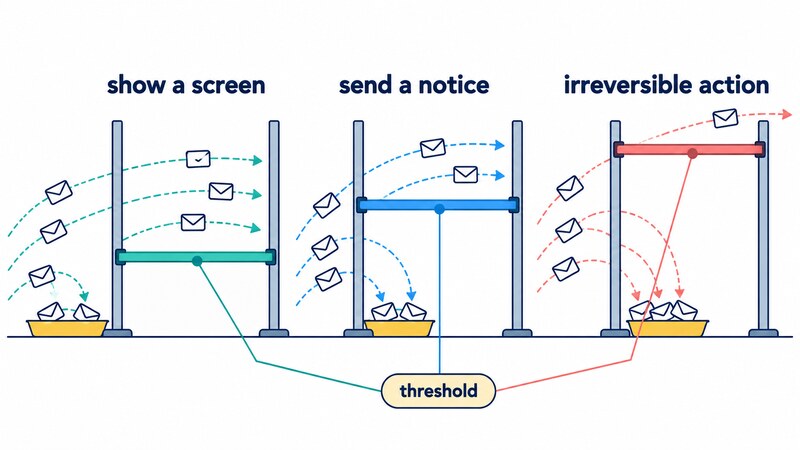
confidence. Choose both ends: a high value above which you are willing to say “yes”, and a low value below which you are willing to say “no”. Send everything in between to a person. - Vary it with the cost of being wrong: the official documentation says a threshold is not a single number and should scale with the consequences of a mistake. In its code example, anything below 0.5 goes to a human. At 0.5 or above, showing an account balance (a screen display) goes ahead as is. Approving a transfer (an action that cannot be undone) asks the user to confirm between 0.5 and 0.9, and is executed with confirmation above 0.9. A medium-weight action such as sending a notice does not appear in the official example; placing it in between is my own illustration. The documentation also says the right values depend on your domain and your own data, so do not read these numbers as fixed.
One more caution is easy to forget. confidence is just a restatement of the probabilities, so if the probabilities themselves are off, confidence will not fix them.
For example, “the writer is asking for a refund” and “the writer is not asking for a refund” do not necessarily add up to 1 when asked in the same call. For 4 fictional messages, the two probabilities summed to 0.94, 1.01, 0.96 and 1.00. Most are close to 1, but the sum was off by as much as 0.06 for some messages.
That is only 4 messages, but it shows that a probability does not always mean what it appears to mean. Choose thresholds on your own data, looking at how often the answers are actually right. The official documentation likewise recommends starting with conservative thresholds and adjusting as you observe results on your own data.
The official page on Jev 1.13’s rough edges also notes that scoping words (words that limit a condition, such as “only” or “except”), negations and implied conditions are read at face value, so oddities with negated questions are not surprising.
How this was checked, and its limits
The checks reported here come from calls to the live API on October 19, 2026 (jev-1.13.0, @typesafe-ai/sdk 0.7.0, Node.js v22.12.0). The tables in the Choice and Score sections, such as the 0.8 and 0.6 examples, are arithmetic on the published formulas, not API output. Values vary slightly from call to call, so the numbers in this article are from the run shown. All message texts are fictional and written for this article.
- With 8 messages × 9 questions, the 64 Choice and Score answers matched recomputation from the published formula within 0.015 (largest gap 0.005). Noul answers contained only
typeandnoul. - The experiment of adding 3 options used only 3 messages, and the answer changed for 1 of them. I have not investigated the cause.
- The experiment on the sum of a question and its negation used only 4 messages.
Here is what I did not check. The server’s source is not public, so I do not know whether it actually computes confidence with this formula. I also did not measure how well the probabilities are calibrated, that is, whether an answer given “70%” really is right 70% of the time.
Summary: a checklist before you set a threshold
- [ ] Choice
confidencemeasures how far the top probability sits above a pure guess. It ignores how the runners-up are split. - [ ] With a different number of options, the same top probability gives a different
confidence, and the sameconfidenceneeds a different top probability. Set thresholds per question. - [ ] When you add or remove options, the probabilities may change too. Set the threshold again.
- [ ] Score
confidencemeasures how tightly the answer is bunched around its most likely level. It is separate from thescorevalue. - [ ] Noul has no
confidence. Put the threshold on the probability itself. - [ ] Vary the threshold with the cost of being wrong. Start conservative and adjust on your own data.
- [ ]
confidencerestates the probabilities, so it does not repair distorted probabilities.
Back to the opening question. A confidence of 0.9 means the top probability has covered 90% of the road from a pure guess to certainty. In terms of the top probability, that is anywhere from 0.91 to 0.95, and the top probability may not equal how often the answer is actually right. Knowing what the scale measures is the first step toward placing a threshold you can trust with automatic processing.
Other parts of this series
- Trying Jev: A Model That Answers With Types and Confidence Instead of Prose (Series Part 1)
- Jev vs. Open-Source Jev-Compatible Classifiers: Laya, Kev and Von on a MacBook (Series Part 2)
Primary sources
- Confidence (official documentation) (the Choice, Score and Noul formulas, the top probability and first-to-second ratio, thresholds that scale with risk; checked 2026-10-19)
- Primitives (official documentation) (the three question types: Choice, Score and Noul)
- Confidence-gated routing (official documentation) (a pattern for routing work by confidence)
- Jev 1.13 jaggedness (official documentation) (known rough edges of Jev, including how negations are read)
- system-one-adapter-python (GitHub) (the official Python adapter; formula implementation, MIT license)
- @typesafe-ai/sdk (npm) (the SDK used for the calls)