

Checking the Entry Point with import.meta.url in Node.js ESM, and How That Check Breaks
The string comparison holds only while your paths contain nothing that needs percent-encoding
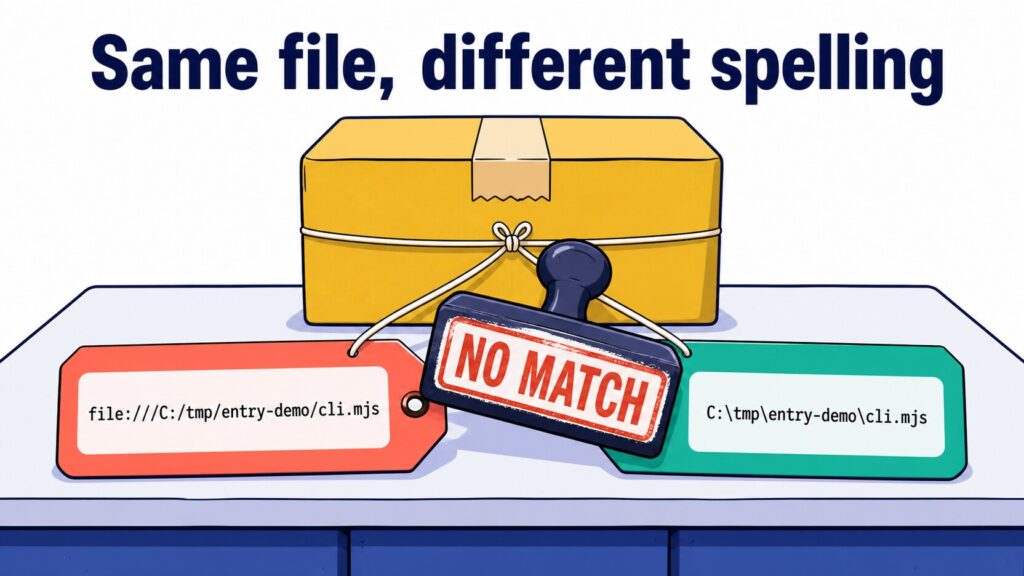
One script, two machines. On Linux it does what you wrote it to do. On Windows it prints nothing at all: no exception, no warning, exit code 0. Nothing in the output says that anything went wrong, so the first thing you reach for is your own logic.
Here is the whole program. It is an ESM command line tool that wants to run main() when it is executed directly, and to stay quiet when some other file imports it.
// cli.mjs
export function build() {
  return 'built';
}

function main() {
  console.log(build());
}

if (import.meta.url === `file://${process.argv[1]}`) main();
Running that file by name on Linux (here, Ubuntu under WSL, which runs Linux on a Windows machine, Node.js v18.19.1) makes the condition true and prints built. The same launch on Windows 11 (Node.js v22.12.0) makes it false and prints nothing. In both runs the file being executed is unquestionably the entry point.
== Windows: node cli.mjs ==
exit=0

== Linux: node cli.mjs ==
built
exit=0
So why does one expression return opposite answers on two machines? And if you swap it for the idiom that gets quoted as the correct one, is the problem actually gone?
What an entry point is, and what require.main === module was doing
The entry point is the file the process loads first. Type node cli.mjs and cli.mjs is the entry point; anything it imports is not. The distinction matters as soon as you want one file to be both a runnable tool and an importable module.
CommonJS had a one-liner for this. require.main holds the module object of the entry point and module is the current module, so if those two are the same object, the file you are inside of is the entry point. The important part is that this compares two runtime objects for identity. No strings are involved, so there is nothing to spell.
// CommonJS
if (require.main === module) main();
ESM has neither module nor require. What it has instead is import.meta.
import.meta.url lives in the URL layer, process.argv[1] in the path layer
import.meta is an object available only inside ESM, carrying information about the module you are in. The one property present everywhere is import.meta.url, and the documentation defines it as “The absolute file: URL of the module.” It is a URL, not a path, and that single word is the whole story.
A file: URL expresses a local file in URL syntax: file://, then a host name (normally empty), then a path that starts with /. POSIX — the interface standard Linux and macOS follow — already gives you paths that start with /, so you get three slashes in a row, as in file:///home/me/tools/cli.mjs. A Windows drive letter gets the same treatment and every separator is normalised to a forward slash: file:///C:/tmp/entry-demo/cli.mjs.
Percent-encoding is how a URL carries characters it cannot spell literally: a % followed by two hex digits. A space becomes %20, # becomes %23, and anything outside ASCII is encoded one UTF-8 byte at a time. # is not optional here — in a URL it starts the fragment, so a # that is really part of a directory name has to be escaped or the rest of the path stops being path.
process.argv[1] is not a URL at all. The documentation says “If a program entry point was provided, the second element will be the absolute path to it.”, so what you get is an absolute path in the platform’s own notation: C:\tmp\entry-demo\cli.mjs on Windows, /home/me/entry-demo/cli.mjs on Linux.
![Two service windows issue slips for the same file — the URL layer window issues import.meta.url as file:///C:/tmp/entry-demo/cli.mjs and the path layer window issues process.argv[1] as C:\tmp\entry-demo\cli.mjs — and the string compare arrow drawn straight between the two slips is crossed out](https://www.hirose-paper-mfg.com/wp2021/wp-content/uploads/2026/08/import-meta-url-entry-point-check-fig-02-en.jpg)
The opening snippet compares one of each and glues file:// onto the path to make up the difference. Two spellings of the same file, produced under two different sets of rules, are not going to line up because you prefixed a scheme onto one of them.
Four idioms, and where each one stops working
There are effectively four ways people write this check. It is worth seeing all four before picking any of them apart.
| Idiom | What it does | Where it fits | Caveat |
|---|---|---|---|
String concatenation (file:// followed by process.argv[1]). Shown as naive in the output below | prefixes the path with file:// and compares the strings | short enough to spread quickly, but there is no situation where it is worth recommending | never matches on Windows, and on POSIX it also fails once the path contains a space, a #, or non-ASCII |
Compare against pathToFileURL(process.argv[1]).href | converts the path into a proper file: URL first, then compares | when you know the program is only ever started as node <filename> | fails for node . and for launches that go through a link |
Compare after realpath plus module resolution (following package.json main and friends to decide which file is really read) | resolves argv[1] down to a file, follows links, and only then lifts it into the URL layer | tools you ship, where you cannot know how they will be started | more lines to carry |
import.meta.main | reads the answer the runtime already has | when you can require a recent Node.js | added in v24.2.0 / v22.18.0, so it is undefined before that |
The last one is the shortest and it is where this ends up. It is also documented as Stability: 1.0 - Early development and has a trap of its own, so it is worth walking the other three first.
The measurements
Here is the Windows machine (Windows 11, Node.js v22.12.0) printing the raw values, plus both comparisons, for a plain node cli.mjs.
== 1. node cli.mjs ==
argv[1]      : C:\tmp\entry-demo\cli.mjs
meta.url     : file:///C:/tmp/entry-demo/cli.mjs
naive        : false
pathToFileURL: true
meta.main    : undefined
Two separate things are wrong with the concatenated string. The separators differ, \ against /, and gluing file:// onto C:\tmp\... produces file://C:\tmp\..., which never grows the third slash. Either one on its own is enough to explain why this check never fires on Windows.
Does that mean POSIX is safe, since the separators already agree? This is the part worth slowing down for. Below, the same conversion is run against POSIX-style paths — the run is on the same Windows machine with pathToFileURL(p, { windows: false }) to force POSIX interpretation, and the real Linux box backs it up in the five cases further down.
"/home/me/tools/cli.mjs"
  naive  : file:///home/me/tools/cli.mjs
  correct: file:///home/me/tools/cli.mjs
  equal  : true
"/home/me/my tools/cli.mjs"
  naive  : file:///home/me/my tools/cli.mjs
  correct: file:///home/me/my%20tools/cli.mjs
  equal  : false
"/home/me/ツール/cli.mjs"
  naive  : file:///home/me/ツール/cli.mjs
  correct: file:///home/me/%E3%83%84%E3%83%BC%E3%83%AB/cli.mjs
  equal  : false
"/home/me/c#/cli.mjs"
  naive  : file:///home/me/c#/cli.mjs
  correct: file:///home/me/c%23/cli.mjs
  equal  : false
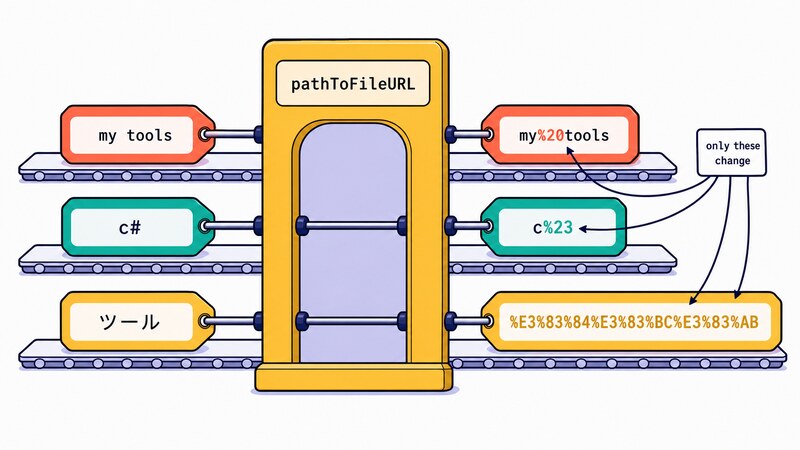
Windows behaves the same way once the path stops being plain. Here is the same script again, run from a directory with a space and a # in its name, and then from one with non-ASCII characters.
argv[1]      : C:\tmp\entry demo#2\cli.mjs
meta.url     : file:///C:/tmp/entry%20demo%232/cli.mjs
naive        : false
pathToFileURL: true
meta.main    : undefined

== non-ASCII path ==
argv[1]      : C:\tmp\entry-デモ\cli.mjs
meta.url     : file:///C:/tmp/entry-%E3%83%87%E3%83%A2/cli.mjs
naive        : false
pathToFileURL: true
meta.main    : undefined
? is another character that would be encoded, but Windows file names cannot contain it, so it was not measured here.
And then the Linux result, which is the one that changes how you should read the opening. The check that returned true there flipped to false after nothing more than copying the directory to $HOME/my tools/ and running it from the new location. It was never “works on Linux”. It was works on POSIX, for a path containing not one character that needs percent-encoding, launched by naming the file directly — and only then.
It is tempting to compress that into “fine as long as the path is ASCII”, but the output just above refutes it. The space in my tools and the # in c# are both ASCII, and both come out equal : false. What decides the outcome is not the character set but whether the character gets encoded. Until someone checks out the repository into a directory with a space in it, the defect stays invisible.
The conversion you actually want is in the standard library. The documentation for url.pathToFileURL() says “This function ensures that path is resolved absolutely, and that the URL control characters are correctly encoded when converting into a File URL.”, which is exactly the two jobs being skipped. The mirror image, url.fileURLToPath(), lets you drop the URL down to a path instead; it is the same fix, applied in the other layer.
import { pathToFileURL } from 'node:url';

if (import.meta.url === pathToFileURL(process.argv[1]).href) main();
The correct idiom breaks on two ordinary launches
Look at the pathToFileURL: true in that first measurement again, because it does not survive a change in how the program is started.
The first way is node .. In a directory whose package.json names index.mjs as main, the same script reports this.
== 4. node . ==
argv[1]      : C:\tmp\entry-demo
meta.url     : file:///C:/tmp/entry-demo/index.mjs
naive        : false
pathToFileURL: false
meta.main    : undefined
process.argv[1] is the directory you typed, made absolute and nothing more. It is not the file that ended up being loaded. import.meta.url is on the far side of module resolution, pointing at index.mjs. Converting the layers correctly does not help when the two operands sit on opposite ends of resolution.
The second way is through a link. A pair of booleans cannot tell you which side is the link and which side is the target, so this run prints the values themselves, from a file placed in the same directory and launched through the link path.
== C-junction: node C:\tmp\entry-link\values.mjs ==
case         : C-junction
argv[1]      : C:\tmp\entry-link\values.mjs
meta.url     : file:///C:/tmp/entry-demo/values.mjs
pathToFileURL: false
process.argv[1] kept entry-link, exactly as it was typed on the command line, while import.meta.url reports entry-demo, the real location. Node.js ships a flag called --preserve-symlinks-main whose documentation reads “Instructs the module loader to preserve symbolic links when resolving and caching the main module (require.main).” A flag that exists in order to keep symlinks is a reasonable sign of what the default does. (What that flag actually changes was not measured here.)
![A cutaway corridor in which argv[1] stops here at each entrance — holding C:\tmp\entry-demo on the node . route above and C:\tmp\entry-link\values.mjs on the through a link route below — while import.meta.url carries on to the resolved real path of each route, file:///C:/tmp/entry-demo/index.mjs above and file:///C:/tmp/entry-demo/values.mjs below](https://www.hirose-paper-mfg.com/wp2021/wp-content/uploads/2026/08/import-meta-url-entry-point-check-fig-04-en.jpg)
Between them, those two runs spell out the missing steps. Take argv[1], resolve it down to a file, follow the links, and only then lift it into the URL layer.
// isentry.mjs
import { realpathSync } from 'node:fs';
import { pathToFileURL } from 'node:url';
import { createRequire } from 'node:module';

export function isEntryPoint(metaUrl) {
  const argv1 = process.argv[1];
  if (!argv1) return false;
  try {
    const resolved = createRequire(metaUrl).resolve(argv1);
    return metaUrl === pathToFileURL(realpathSync(resolved)).href;
  } catch {
    return false;
  }
}
createRequire(metaUrl).resolve(argv1) does the “if it is a directory, find its main” step, realpathSync follows the links down to the real path (where the file actually lives once every link has been resolved), and pathToFileURL moves the result into the URL layer. argv1 can be empty when the code runs in an interactive session and similar contexts, which is what the early return false is for.
That catch deserves a second look, though. Anything that goes wrong during resolution now lands on “not the entry point”, so an unreadable file also means main() silently does not run. That is the same shape as the failure at the end of this article, so decide deliberately whether to swallow it, log it, or rethrow it.
Five launches, three checks
Saying one idiom is “more correct” than another does not tell you how much more. So: five ways to start the program, with the expected answer fixed before anything ran. In A, B and C the file under test is the entry point, so the answer is true; in D and E it is imported by another file, so it is false. Three true and two false, which turns each idiom into a score out of five.
| Case | Launch | Expected |
|---|---|---|
| A-direct | node check.mjs (a file shaped like the tool at the top) | true |
| B-node-dot | node . (package.json has main set to index.mjs) | true |
| C-junction / C-symlink | start check.mjs through a link path | true |
| D-imported | node host.mjs, where host.mjs imports check.mjs | false |
| E-imported-junction | start host.mjs through a link | false |
Windows 11, Node.js v22.12.0. Bold marks a disagreement with the expected value.
| Case | Expected | naive | pathToFileURL | isEntryPoint |
|---|---|---|---|---|
| A-direct | true | false | true | true |
| B-node-dot | true | false | false | true |
| C-junction | true | false | false | true |
| D-imported | false | false | false | false |
| E-imported-junction | false | false | false | false |
That is 2 / 5 for naive, 3 / 5 for pathToFileURL and 5 / 5 for isEntryPoint. Notice where naive earns its two points: D and E, where an expression that returns false on every Windows launch happened to land on an expected false. A completely broken check scores full marks if every case you wrote expects false. That is the route by which this class of defect walks through a test suite untouched.
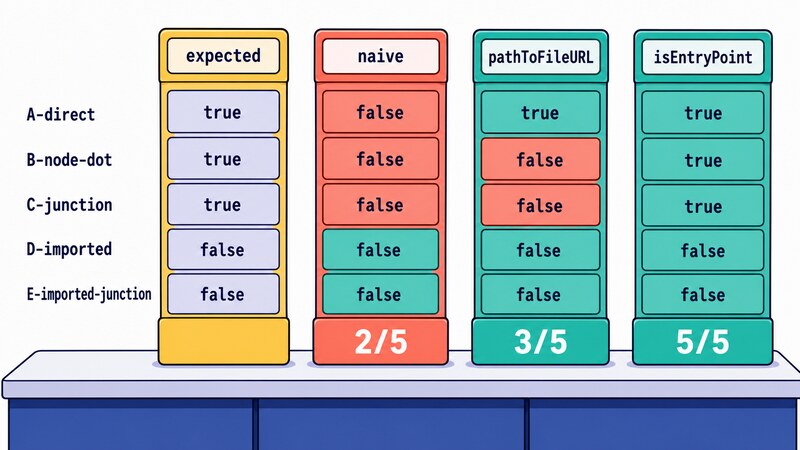
The same five cases on Linux (Ubuntu under WSL, Node.js v18.19.1) move exactly one cell: naive turns true for A-direct, making the scores naive 3 / 5, pathToFileURL 3 / 5, isEntryPoint 5 / 5. One cell is the entire difference between the two platforms, and that cell goes back to false as soon as a directory name in the path picks up a space. The “works on Linux, broken on Windows” from the opening was worth exactly one cell.
A note on how C and E were built on Windows: they use a directory junction (mklink /J, which makes a directory visible from a second path), not a symbolic link. Creating a symbolic link failed with EPERM: operation not permitted, symlink without administrator rights, so the junction stood in for it, and whether a Windows symbolic link behaves identically was not checked. macOS, launches through npx or a global install, and behaviour after a bundler are all outside what was measured.
import.meta.main, and the failure that leaves no trace
Those ten lines (thirteen with the imports) reconstruct, from the outside, an answer the runtime already has. import.meta.main hands it over directly. The documentation records “Added in: v24.2.0, v22.18.0” and describes it as “Equivalent to require.main === module in CommonJS.” The CommonJS one-liner, returned to ESM unchanged.
export function build() {
  return 'built';
}

function main() {
  console.log(build());
  process.exitCode = 0;
}

if (import.meta.main) main();
It is short, it reads well, and going by the documented behaviour it does not care how the program was launched or which platform it is on. That is the specification talking rather than a measurement, though: no machine where it returns true was available for this article. The same page also carries Stability: 1.0 - Early development.
So is that the end of it? Read the added-in line once more.
Before those versions, import.meta.main is simply a property that is not there. Accessing it is not an error; it returns undefined. And undefined is falsy, so if (import.meta.main) main() quietly does nothing. Running the file above with node tool.mjs on v22.12.0 produced this.
--- node tool.mjs ---
exit=0  (stdout above is everything printed)
Empty stdout, exit code 0. No warning, no exception. In the five-case run further up, the import.meta.main column was undefined in every single case. The program stopped working and left nothing behind to say so.
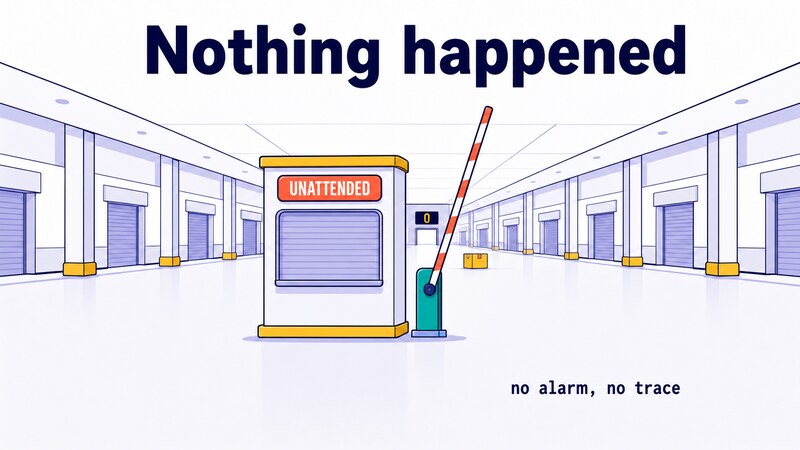
This is the hardest failure in the whole topic to notice. The string comparison at least leaves you a clue, in the form of behaviour that differs between machines. Moving to import.meta.main on an older runtime fails by nothing happening, so the build stays green and the reason does not surface until someone runs node -v. Note again that a machine on v22.18.0 or later, or v24.2.0 or later, returning true was not part of these measurements; the added-in versions here are quoted from the documentation.
Wrapping up
The entry point check is a question about two representations of one file, and which layer you flatten them into before comparing. import.meta.url is a URL and process.argv[1] is a path, and only the URL side carries rules about slashes and percent-encoding. Concatenating strings ignores that difference, which is why it lands only on POSIX, only for a path with nothing in it that needs percent-encoding, and only when the file is named directly on the command line.
If you can require Node.js v24.2.0 / v22.18.0 or newer, use import.meta.main and be done with it. The Stability: 1.0 - Early development label does come attached, and Node’s stability index defines that tier as “The feature is not subject to semantic versioning rules. Non-backward compatible changes or removal may occur in any future release. Use of the feature is not recommended in production environments.” So it sits outside semver, a future release may change it incompatibly or drop it, and the documentation does not recommend it in production. Handing the decision back to the runtime is still worth a lot, so weigh that against the label and choose. If older versions are still in scope, keep a fallback for the undefined case, and the migration itself will not turn into another instance of nothing happening.
import { isEntryPoint } from './isentry.mjs';

if (import.meta.main ?? isEntryPoint(import.meta.url)) main();
?? evaluates its right side only when the left side is null or undefined, so on a newer runtime where import.meta.main returns false, the right side never runs. On v22.12.0, the version measured here, import.meta.main was undefined, so the fallback is what answers. It costs lines, and it buys the same answer across all five launches measured on Windows and Linux.
One last question to take away. Does your tool return the same answer when it is started from a home directory with a space in its name, when it is started with node ., and when it is started through a link? Before you rewrite the condition, write down a handful of launches and their expected answers first. Then “how correct is it” has a number instead of an opinion.
Primary sources
- Node.js Documentation:
import.meta.url(basis forimport.meta.urlbeing the absolutefile:URL of the module) - Node.js Documentation:
import.meta.main(basis for the added-in versions v24.2.0 / v22.18.0, the equivalence torequire.main === module, and theStability: 1.0 - Early developmentlabel) - Node.js Documentation:
process.argv(basis forprocess.argv[1]being the absolute path to the entry point) - Node.js Documentation:
url.pathToFileURL()(basis for it handling both absolute resolution and control-character encoding) - Node.js Documentation:
url.fileURLToPath()(basis for comparing in the path layer instead) - Node.js Documentation:
--preserve-symlinks-main(source of the statement that a flag exists for keeping symlinks when resolving the main module) - Node.js Documentation: Stability index (basis for
Stability: 1.0 - Early developmentsitting outside semver and not being recommended in production)