
An async onClick Handler’s Exception Never Reaches React’s Error Boundary
A microtask still meets the deadline for preventDefault(); a task started with setTimeout(0) does not

Picture an ordinary form: a submit button that opens a confirmation dialog, and a single checkbox for consent. Nothing exotic about either one. Every experiment in this article runs on those same two widgets.
Start with the submit button. Click it, a confirmation dialog pops up, you cancel it — that should be the end of the story. Instead, the button never responds to another click.
Nothing on the screen explains why. Open the developer console, and there’s exactly one red line waiting for you.
You’ve probably run into a bug like this before. Why does it happen? Trace the cause far enough back, and it starts at the exact moment onClick becomes async.
An async handler’s return value has no receiver
Pass an async function to <button onClick={handleSubmit}>, and that function no longer returns void. Every call now returns a Promise instead. That part is common knowledge.
The catch is that nobody is holding onto that Promise. DOM event dispatch — the synchronous sequence that runs from the moment an event fires, through every registered listener, up to the point where the browser decides whether to run its default action (the browser’s own built-in reaction) — never waits for a listener’s return value. React doesn’t await the return value of onClick, either. So an exception thrown inside handleSubmit has no path back to any caller.
A regular synchronous function propagates its exception straight to the caller, and inside a React render an exception is caught by an Error Boundary. An exception inside an async function takes a different shape entirely: it becomes a rejected Promise. A rejected Promise with no one listening is, to the JavaScript engine, simply a failure that nobody handled.
React’s official documentation draws a hard line around what an Error Boundary catches: exceptions inside event handlers and exceptions inside asynchronous code are explicitly out of scope (reference 1). An async onClick checks both of those excluded boxes at once.
The only destination is unhandledrejection
So where does a rejected Promise with no receiver go? To the unhandledrejection event. MDN documents that it fires whenever a Promise is rejected and no handler has been attached to deal with that rejection (reference 2).
Figure 1 shows how the two familiar paths and this third one diverge: a synchronous handler’s exception gets thrown back up to the caller, a rendering exception lands in an Error Boundary, and an async handler’s exception slips past both of them and escapes through unhandledrejection.
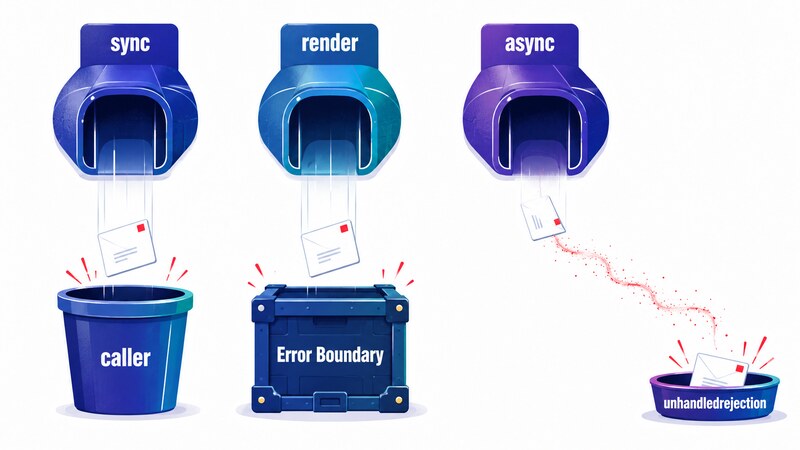
Here’s the part that trips people up: nothing is being silently swallowed. The browser fires unhandledrejection exactly as specified, and when you actually run it, the console shows exactly one line:
[error] Uncaught (in promise)That single line doesn’t obviously connect to “clicking the button does nothing.” That gap is exactly why bugs like this one are so hard to spot.
Recovery belongs in finally, not catch
Here’s what happened when I actually ran it. askConfirm(), standing in for the confirmation dialog, throws before execution ever reaches the try block. I wrote two versions that differ only in where the recovery code lives.
- A1: reset the submitting flag inside
catch - A2: reset the same flag inside
finally
Because askConfirm() fails outside the try, catch never sees it. Clicking A1 once, then a second time, produced this:
[unhandledrejection] reason=Error: confirm helper failed
A1 ignored: already submitting
The first click let the exception slip past catch, leaving the submitting flag stuck at true. The second click hit the guard at the top of the handler and did nothing — the exact symptom from the introduction.
A2, on the other hand, ran fine both times, because finally always runs no matter how the block exits:
A2 catch: confirm helper failed
A2 catch: confirm helper failed
“Telling the user something failed” and “putting the state back the way it was” are two separate concerns, and they need separate homes. catch covers part of the first one. Only finally guarantees the second. If you want state restored no matter which path a failure takes, that code belongs in finally from the start.
How late can preventDefault() still make the deadline?
There’s a second trap that async handlers set, and this one is about when you call preventDefault().
Looking at the same async-handler problem from a different angle needs a default action you can actually see, so this part of the running example uses the checkbox from that same form. A checkbox’s click has an obvious default action — toggling whether it’s checked — so it’s easy to tell at a glance whether that action was stopped.
Three handlers differ only in where preventDefault() is called.
- B1: call it synchronously
- B2: call it after
await Promise.resolve() - B3: call it after
await sleep(0)(viasetTimeout)
Honest admission: before running this, I expected that crossing even a single await would make preventDefault() too late. The measurements said otherwise.
| Handler | checked after dispatch completes | Default action |
|---|---|---|
| B1 (synchronous) | false | stopped |
B2 (after await Promise.resolve()) | false | stopped |
B3 (after await sleep(0)) | true | not stopped |
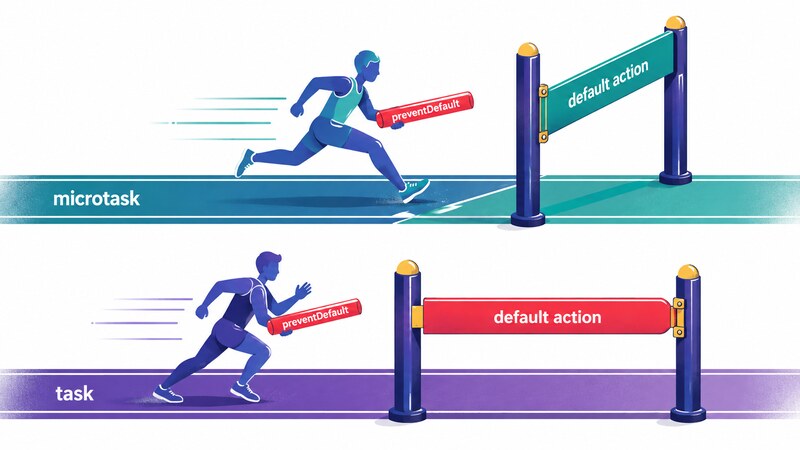
B2 crosses an await and still makes it in time. The real boundary isn’t “did you cross an await” — it’s whether the continuation comes back as a microtask or spills into a separate task (also called a macrotask). A continuation from Promise.resolve() is queued on the microtask queue, and that queue drains before the event’s dispatch finishes. A continuation from setTimeout(0) is queued as a task, which only runs once dispatch is long over.
Figure 2 shows where those two continuations land relative to the closing gate.
defaultPrevented only tells you it was called
Here’s another place I nearly drew the wrong conclusion. Logging event.defaultPrevented and checked from inside the handler gave the same values for B1, B2, and B3:
B1 sync: defaultPrevented=true checked=true
B2 microtask: defaultPrevented=true checked=true
B3 timer: defaultPrevented=true checked=true
Read only that, and it looks like preventDefault() succeeded in all three cases. But those values are read from inside the handler, and a checkbox is checked once before dispatch begins and, if the event was canceled, un-checked again afterward. At the point where the handler runs, that reversal hasn’t happened yet, so checked always reads true there.
Reading the DOM again after dispatch had fully finished told a different story:
{"B1_sync": false, "B2_microtask": false, "B3_timer": true}defaultPrevented stayed true in all three. In other words, that property only tells you whether preventDefault() was called — never whether the call arrived in time. Trust it for timing, and you’ll miss cases like B3, where the default action ran anyway.
The same handler flips outcomes between a test and a real browser
This is the discovery I found most useful for day-to-day work. I kept B2’s handler (preventDefault() after await Promise.resolve()) completely unchanged and only changed how the event was fired.
| How the event fired | checked after dispatch | Default action |
|---|---|---|
| A real mouse click | false | stopped |
el.click() from JavaScript | true | not stopped |
Same code, opposite outcome. Why would that happen?
It comes down to when the microtask checkpoint runs. The microtask queue drains the moment the JavaScript call stack empties. A real mouse click invokes the listener from the browser’s own task, so the stack empties as soon as the listener returns, and the await continuation slips in before dispatch is fully done. el.click(), by contrast, is invoked from on top of a stack that your own script is already running, and that stack doesn’t empty until every synchronous statement around it has finished. By the time it does, dispatch is long over, and the await continuation runs after the fact.
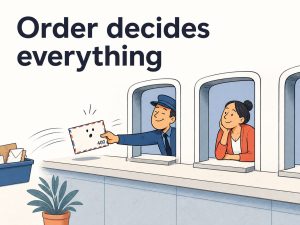
Figure 3 shows how the two calling paths leave the stack in a different state.

This has real weight in practice. Behavior you confirmed with el.click() in a test might not hold for an actual user action, and the reverse is just as possible. A test can stay green while the real browser is broken, or the real browser can work fine while a test’s simulated firing can’t reproduce it. The way a test fires an event can quietly undermine the very assumption it’s trying to verify.
Browsers keep going; Node stops
One more comparison: run the same shape of code as the submit handler — call the confirmation step, then the real work, and let nothing hold onto the returned Promise — but on the server, in Node.js instead of a browser. Not awaiting the return value of an async function is exactly the same pattern as the event handler.
With no handler attached, the run looked like this:
Error: confirm failed
    at confirmThenSubmit (file:///.../node-unhandled.mjs:3:9)
    ...
Node.js v22.12.0
EXIT=1
The setTimeout log that was supposed to print 100ms later never showed up, because the process had already exited. A browser keeps running after firing unhandledrejection, but Node.js, by default, treats an unhandled rejection as grounds to exit the process.
Attaching process.on("unhandledRejection", ...) changes the outcome:
process.on(unhandledRejection) reason: Error: confirm failed
still alive after 100ms
EXIT=0
Identically written code ends very differently depending on where it runs. Keep this in mind when you bring browser-style code into a Node environment, such as server-side rendering or a batch job.
The scope of what this article measured
Every measurement here was run by hand, locally. On the browser side, I ran the same steps on both Chrome 152 and Chrome 148, and the A and B results matched exactly between them. Node.js was v22.12.0.
Firefox and Safari were not tested. The only default action used here is a checkbox toggle, so whether form submission or following a link share the same microtask-versus-task boundary is outside what this article checked.
What to take away
An async onClick is convenient, but it quietly breaks a handful of assumptions you didn’t know you were relying on. Here’s what these measurements leave you with.
- Where you need to roll back state after a failure — the submit button here — put that recovery in
finally, notcatch. The failure path can sit entirely outside thetryblock. - Where you need to stop a default action — the checkbox here — make the decision to call
preventDefault()as close to synchronous as you can. In this measurement, a single microtask’s worth of delay still made it, but pushing the continuation into the next task withsetTimeoutdid not. Because dispatch finishes synchronously within a single task, and asetTimeoutcontinuation always lands in the next task, it’s reasonable to guess that other default actions — form submission, following a link — follow the same rule, but this article only confirmed it for a checkbox. - As the same checkbox example showed, don’t use
event.defaultPreventedto judge whether a call arrived in time. It only tells you whether the call happened at all. - When a test fires an event with
el.click(), keep in mind that the outcome can differ from what happens on a real user action.
An async event handler is easy enough to write that these mismatched assumptions are easy to miss entirely. Try it by hand once, and it stops being abstract.
Primary sources
- React documentation — Catching rendering errors with an error boundary (the basis for Error Boundaries excluding exceptions inside event handlers and asynchronous code)
- MDN — Window: unhandledrejection event (the condition that fires the event: a rejected Promise with no attached rejection handler)
- Node.js documentation — Event: ‘unhandledRejection’ (the basis for Node.js treating an unhandled rejection as grounds for a default process exit)
- MDN — Using promises: Task queues vs. microtasks (the basis for microtasks draining once the JavaScript call stack empties)